


AZip Helps Manage, Create ZIP Archive Content Efficiently
By Timothy Tibbettson 06/15/2023 |
AZip is a useful portable utility that enables you to efficiently manage and create ZIP archive content.
This little utility is full of useful options to help better manage compressed archives like built-in content search, smart archive Update, archive Recompression and it is presented from a UI that is purpose driven with no extra fluff to over complicate the job at hand. You will be able to Add/Remove/Extract files along with the benefits of multiple unique functions. These functions include super-fast in-archive Search function: content and/or entry name search through a Zip archive. And there are no temp files written.
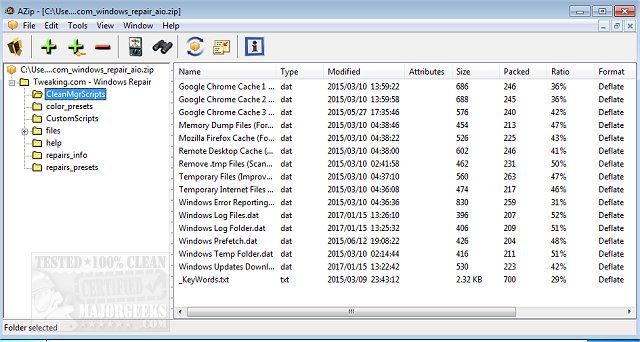
AZip also includes a Smart Archive Updater that will only change new or modified files, Archive Recompression so you can make Zip archives even smaller, and you will able to toggle from Flat view to Tree view quickly, and back depending on your needs. You get support for Multi-documents as well as support for file encryption. AZip fully supports the following compression methods; Reduce, Shrink, Implode, Deflate, Deflate64, BZip2, and LZMA. It can also be used in concert with other Zip Archivers regardless of OS.
Download @ https://www.majorgeeks.com/files/details/azip.html
comments powered by Disqus
This little utility is full of useful options to help better manage compressed archives like built-in content search, smart archive Update, archive Recompression and it is presented from a UI that is purpose driven with no extra fluff to over complicate the job at hand. You will be able to Add/Remove/Extract files along with the benefits of multiple unique functions. These functions include super-fast in-archive Search function: content and/or entry name search through a Zip archive. And there are no temp files written.
AZip also includes a Smart Archive Updater that will only change new or modified files, Archive Recompression so you can make Zip archives even smaller, and you will able to toggle from Flat view to Tree view quickly, and back depending on your needs. You get support for Multi-documents as well as support for file encryption. AZip fully supports the following compression methods; Reduce, Shrink, Implode, Deflate, Deflate64, BZip2, and LZMA. It can also be used in concert with other Zip Archivers regardless of OS.
Download @ https://www.majorgeeks.com/files/details/azip.html
comments powered by Disqus
