


Bitser Manages Numerous Compression File Formats
By Timothy Tibbettson 06/15/2023 |
Bitser allows efficient managing of ZIP, ZIPX, 7Z, RAR, ISO, MSI, VHD, GZIP, BZIP2,TAR, RAR5, DMG, LZMA, LZMA2, NTFS, FAT, MBR, SquashFS, CramFS, CAB, CPIO, DEB, LZH, NSIS, RPM, UDF, WIM, XAR, XZ, Z and has additional features not found in other compression programs.
Installation is required, and Bitser gives you the option of adding to your Context Menu during the installation. You can add or remove this after installation.
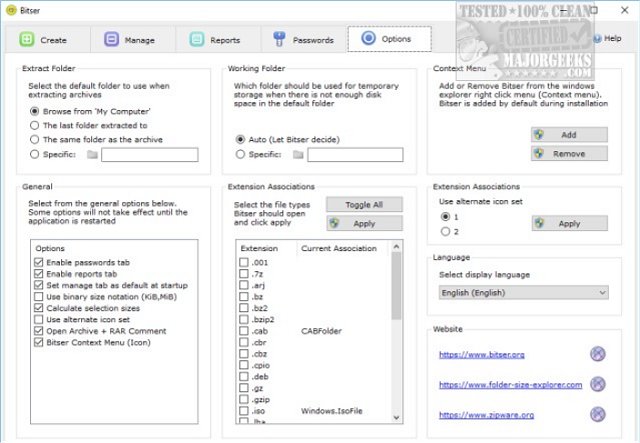
Bitser is simple to use with a set of tabs across the top for Create, Manage, Report, Passwords, and Options. Underneath the tabs is a familiar Explorer interface. Bitser uses a black and white layout with some subtly colored icons.
Bitser includes an MD5/SHA checksum calculator, a password manager, and can even calculate folder sizes and find empty subfolders from the File Explorer Context Menu. For the security conscious, you can also create AES-256 encryption password protected archives.
The options menu has enough settings for even power users, so Bitser works how you want it to.
Bitser made some pretty tall claims, and we admit we didn't think it could live up to the claims. The interface is clean and easy to navigate, and the addition of a password manager, checksum calculator and folder calculator adds tools not found in most of the competition at any price.
Download @ https://www.majorgeeks.com/files/details/bitser.html
comments powered by Disqus
Installation is required, and Bitser gives you the option of adding to your Context Menu during the installation. You can add or remove this after installation.
Bitser is simple to use with a set of tabs across the top for Create, Manage, Report, Passwords, and Options. Underneath the tabs is a familiar Explorer interface. Bitser uses a black and white layout with some subtly colored icons.
Bitser includes an MD5/SHA checksum calculator, a password manager, and can even calculate folder sizes and find empty subfolders from the File Explorer Context Menu. For the security conscious, you can also create AES-256 encryption password protected archives.
The options menu has enough settings for even power users, so Bitser works how you want it to.
Bitser made some pretty tall claims, and we admit we didn't think it could live up to the claims. The interface is clean and easy to navigate, and the addition of a password manager, checksum calculator and folder calculator adds tools not found in most of the competition at any price.
Download @ https://www.majorgeeks.com/files/details/bitser.html
comments powered by Disqus
