


FYI: Your Windows Defender is Broken
By Timothy Tibbettson 06/15/2023 |
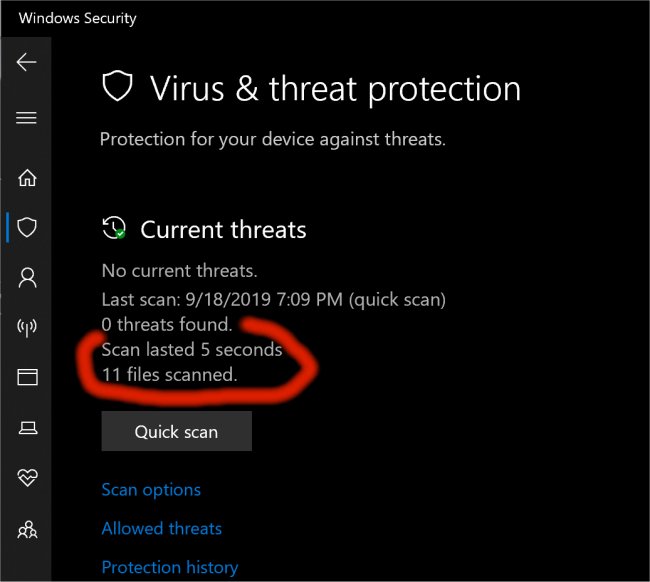
Nope, that is not clickbait; it is as the title suggests. Something went awry with the 9/17/2019 Windows 10 update 10.018362 causing Defender to only be able to scan a few files (in my case 11) before reporting the all-clear. This is not the case, and the problem exists for both a quick scan and full scan.
Because Defender is built into the OS creating a workaround for this is -- well not possible. Nor does monkeying about with any of the available scan options have any effect.
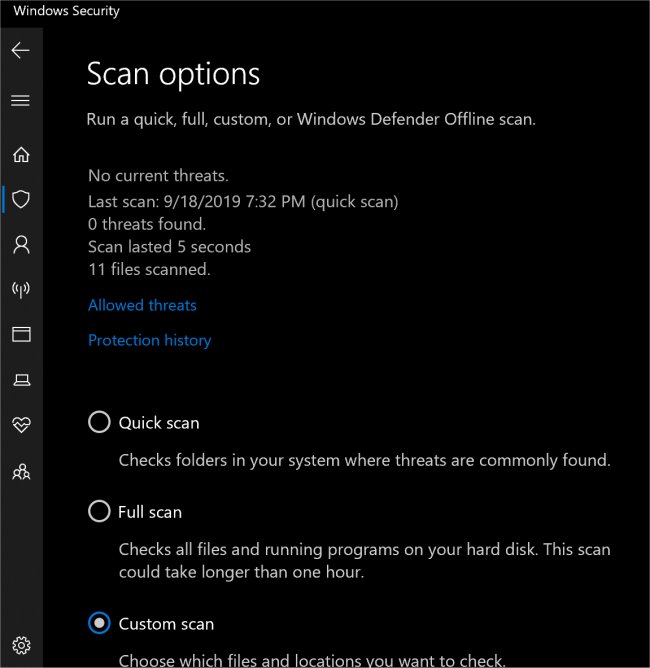
The only thing that helps is to go your 'Windows Security' settings click "Virus and Threat Protection,' click 'Scan Options' and then select "Custom Scan" and choosing manually to scan your whole drive or each drive at a time.
This bug does not appear to affect other functionality like real-time protection or browser protection, so that is good news. So until Microsoft puts out another update to fix this, it's old school manual scanning. Maybe Microsoft will build in the old dial-up connection sound into the boot up with their next update to get a feel for the old days.
Until then - surf safely my friends.
PS: Tired of Microsofts Shenanigans as it pertains to Defenders? We have a ton of quality options for Windows Antivirus Software listed, categorized and rated.
comments powered by Disqus
Because Defender is built into the OS creating a workaround for this is -- well not possible. Nor does monkeying about with any of the available scan options have any effect.
The only thing that helps is to go your 'Windows Security' settings click "Virus and Threat Protection,' click 'Scan Options' and then select "Custom Scan" and choosing manually to scan your whole drive or each drive at a time.
This bug does not appear to affect other functionality like real-time protection or browser protection, so that is good news. So until Microsoft puts out another update to fix this, it's old school manual scanning. Maybe Microsoft will build in the old dial-up connection sound into the boot up with their next update to get a feel for the old days.
Until then - surf safely my friends.
PS: Tired of Microsofts Shenanigans as it pertains to Defenders? We have a ton of quality options for Windows Antivirus Software listed, categorized and rated.
comments powered by Disqus
