


How to Prevent Virtual Reality Motion Sickness or Nausea
By Timothy Tibbettson 06/19/2023 |
Virtual Reality motion sickness is real and very common among Oculus Rift, HTC Vive, and Sony PlayStation VR owners. Even cute, arcade games like Lucky's Tale can give you motion sickness.
With virtual reality in its current state, how do you deal with motion sickness? For most people, it turns out that playing more in moderation will allow you to build up a tolerance.
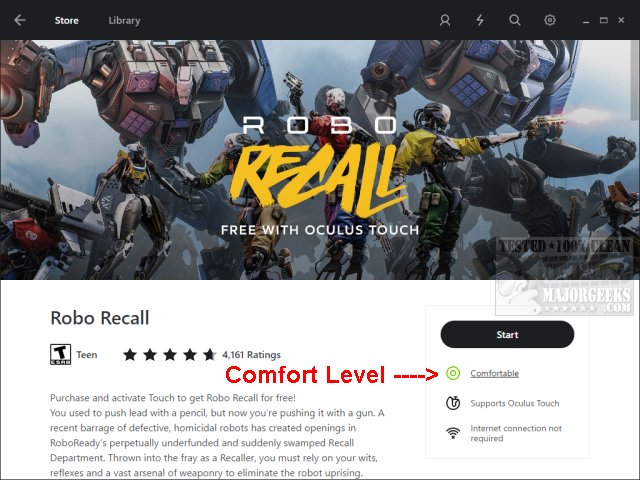
Some places, like the Oculus store, will list a comfort rating allowing you step into virtual reality slower. Oculus will let you know if the game is Comfortable, Moderate, or Intense. If you're new to virtual reality, then you work your way up to moderate, then intense. After about 12 hours of play, we admit to being comfortable enough to seek out intense games just for the rush, and we're no spring chickens.
We found during our Oculus headset review that building a tolerance does indeed work with No Limits 2. On the first ride, we had to remove our headsets after less than ten seconds. And again, and again. Then we were taught that many roller coaster riders would close their eyes as needed the first time riding a new coaster. That worked for us, and we can now ride most VR coasters all the way through with no motion sickness. We also found that our first successful roller coaster ride was after two or three Jack and cokes, but we're reasonably confident that won't work for most people.
Our first virtual reality experience was the included tutorials and games. We recommend you go through any available tutorials to get your "virtual reality legs" followed by any included games before you step into more intense gameplay. For us, Robo Recall was fun and very comfortable.
Know where your feet are. We play in bare feet or socks, for example, and we have a yoga mat and a chair mat about one foot apart. We will occasionally feel the two mats with our toes, so we know where we are in the real world.
Building a tolerance and playing Comfortable to Moderate rated games should allow you to work your way up to more intense games. However, if this does not work for you, try any one of these in no particular order:
Best Bets:
1: Play comfortably rated games.
2: Get used to it, build up to intense games slowly.
3: Orient yourself and know where your feet are.
4: Close your eyes as needed.
If All Else Fails:
1: Limit your time in virtual reality. Play five minutes at a time.
2: Turn down the volume. By default, if your volume is up, it will be too loud.
3: Clean the lenses regularly. They get dirty. Use the included cleaner.
4: Wear your glasses if you have them. Getting used to them is awkward and worth it.
5: Oculus can be calibrated with a small slider. Try calibrating to different positions.
6: Ginger ale, peppermint, and ginger have good effects.
7: Play games that designed for sitting.
8: Over the counter motion sickness medications has been recommended, but not by us.
9: Use eyedrops like Visine to reduce eye strain.
10: Drink Jack Daniels. Disclaimer: Doesn't help with motion sickness, but you can blame puking on that.
Virtual reality is still cutting edge and rough around the edges. Motion sickness or nausea is prevalent, and everybody is different. We believe tolerance is the key for most players, so focus on getting used to it. Numerous hours a day can also cause some aches and pains, so step into virtual reality slowly.
Review: Oculus Rift + Touch Virtual Reality Headset Bundle Review
comments powered by Disqus
With virtual reality in its current state, how do you deal with motion sickness? For most people, it turns out that playing more in moderation will allow you to build up a tolerance.
Some places, like the Oculus store, will list a comfort rating allowing you step into virtual reality slower. Oculus will let you know if the game is Comfortable, Moderate, or Intense. If you're new to virtual reality, then you work your way up to moderate, then intense. After about 12 hours of play, we admit to being comfortable enough to seek out intense games just for the rush, and we're no spring chickens.
We found during our Oculus headset review that building a tolerance does indeed work with No Limits 2. On the first ride, we had to remove our headsets after less than ten seconds. And again, and again. Then we were taught that many roller coaster riders would close their eyes as needed the first time riding a new coaster. That worked for us, and we can now ride most VR coasters all the way through with no motion sickness. We also found that our first successful roller coaster ride was after two or three Jack and cokes, but we're reasonably confident that won't work for most people.
Our first virtual reality experience was the included tutorials and games. We recommend you go through any available tutorials to get your "virtual reality legs" followed by any included games before you step into more intense gameplay. For us, Robo Recall was fun and very comfortable.
Know where your feet are. We play in bare feet or socks, for example, and we have a yoga mat and a chair mat about one foot apart. We will occasionally feel the two mats with our toes, so we know where we are in the real world.
Building a tolerance and playing Comfortable to Moderate rated games should allow you to work your way up to more intense games. However, if this does not work for you, try any one of these in no particular order:
Best Bets:
1: Play comfortably rated games.
2: Get used to it, build up to intense games slowly.
3: Orient yourself and know where your feet are.
4: Close your eyes as needed.
If All Else Fails:
1: Limit your time in virtual reality. Play five minutes at a time.
2: Turn down the volume. By default, if your volume is up, it will be too loud.
3: Clean the lenses regularly. They get dirty. Use the included cleaner.
4: Wear your glasses if you have them. Getting used to them is awkward and worth it.
5: Oculus can be calibrated with a small slider. Try calibrating to different positions.
6: Ginger ale, peppermint, and ginger have good effects.
7: Play games that designed for sitting.
8: Over the counter motion sickness medications has been recommended, but not by us.
9: Use eyedrops like Visine to reduce eye strain.
10: Drink Jack Daniels. Disclaimer: Doesn't help with motion sickness, but you can blame puking on that.
Virtual reality is still cutting edge and rough around the edges. Motion sickness or nausea is prevalent, and everybody is different. We believe tolerance is the key for most players, so focus on getting used to it. Numerous hours a day can also cause some aches and pains, so step into virtual reality slowly.
comments powered by Disqus
