


Strely (Cleaner/Booster/Anti-Shortcut) Eliminates USB Virus Shortcuts and More
By Timothy Tibbettson 06/15/2023 |
Strely (Cleaner/Booster/Anti-Shortcut) was originally designed to help eliminate USB virus shortcuts but has since evolved into a memory booster, drive cleaner, and system tweaker.
Strely might suffer from not only an odd name but an odd interface and even some confusion as to what the end goal is. He lists the app as a cleaner, booster, and anti-shortcut app while misspelling two of those three. That said, he's known for DLL Injector Hacker, so we're giving him a shout out here.
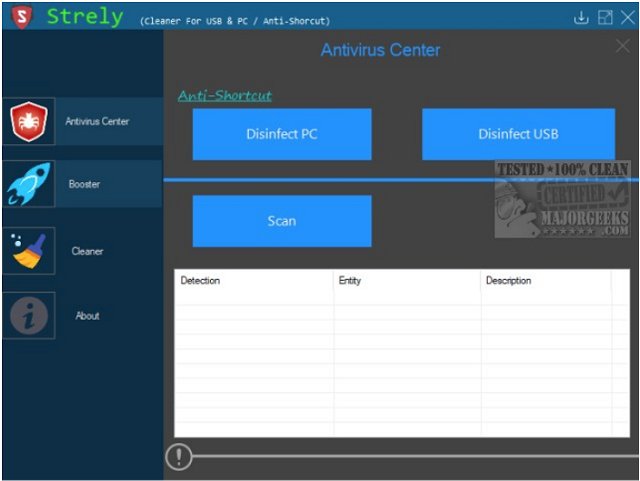
The main tabs to the left start out with the Antivirus Center where you can scan, or disinfect your PC or USB. We don't know what the main scanning engine is here.
The Booster section has a process monitor to see what is using up memory. The Booster button here appears to free up RAM.
Then we have the Cleaner tab which can optimize start*, deactivate Aero Snap and Windows animations, Accelerate Windows Spy*, clean trash files, and more.
We hope to see some more effort put onto Strely (Cleaner/Booster/Anti-Shortcut) but there are indeed some unique and handy tweaks included. *There are also some tweaks in here where it's not explained what will be done, so we're not touching those. A lack of a backup would also be a good idea here because, again, we don't know if we need a System Restore Point, or a registry backup, or both. Still, the app is portable, so there's no harm if you want just to take a look.
Download @ https://www.majorgeeks.com/files/details/strely_(cleanerboosteranti_shortcut).html
comments powered by Disqus
Strely might suffer from not only an odd name but an odd interface and even some confusion as to what the end goal is. He lists the app as a cleaner, booster, and anti-shortcut app while misspelling two of those three. That said, he's known for DLL Injector Hacker, so we're giving him a shout out here.
The main tabs to the left start out with the Antivirus Center where you can scan, or disinfect your PC or USB. We don't know what the main scanning engine is here.
The Booster section has a process monitor to see what is using up memory. The Booster button here appears to free up RAM.
Then we have the Cleaner tab which can optimize start*, deactivate Aero Snap and Windows animations, Accelerate Windows Spy*, clean trash files, and more.
We hope to see some more effort put onto Strely (Cleaner/Booster/Anti-Shortcut) but there are indeed some unique and handy tweaks included. *There are also some tweaks in here where it's not explained what will be done, so we're not touching those. A lack of a backup would also be a good idea here because, again, we don't know if we need a System Restore Point, or a registry backup, or both. Still, the app is portable, so there's no harm if you want just to take a look.
Download @ https://www.majorgeeks.com/files/details/strely_(cleanerboosteranti_shortcut).html
comments powered by Disqus
