


View Essential System Details with myResources
By Timothy Tibbettson 06/15/2023 |
myResources was designed to quickly provide details about your machine's disk, CPU, memory, and network statuses displayed in either graph or active icons.
You will be able to view the above-mentioned resources on a merged graphic chart (SumGraph), providing you with an informative option for monitoring your machine's internal processes. You can adjust the colors of the active icons to suit your taste, and by clicking on a specific resource icon, you will see the associated graph containing the values for the last 30 seconds. These values update every 0.1 seconds giving almost pinpoint accuracy.
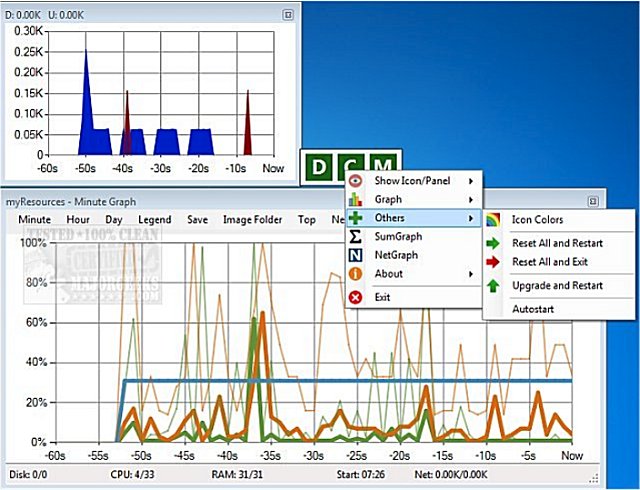
myResources allows the active icons (located on the system tray) to have their appearance customized. Additionally, There is also a special, All in One icon which displays a combined state of resources relying on color to illustrate the most heavily loaded resource. You can also direct the icon panel to sit anywhere on your screen. myResources is nicely done way to view various system info details to keep you well informed about your machine.
myResources Features:
-Resource monitoring with multiple display options
-Active icons for the real-time display of the instantaneous status
-Graphs for monitoring processes
-Easy setting and operation
-Autostart operation option
Download @ https://www.majorgeeks.com/files/details/myresources.html
comments powered by Disqus
You will be able to view the above-mentioned resources on a merged graphic chart (SumGraph), providing you with an informative option for monitoring your machine's internal processes. You can adjust the colors of the active icons to suit your taste, and by clicking on a specific resource icon, you will see the associated graph containing the values for the last 30 seconds. These values update every 0.1 seconds giving almost pinpoint accuracy.
myResources allows the active icons (located on the system tray) to have their appearance customized. Additionally, There is also a special, All in One icon which displays a combined state of resources relying on color to illustrate the most heavily loaded resource. You can also direct the icon panel to sit anywhere on your screen. myResources is nicely done way to view various system info details to keep you well informed about your machine.
myResources Features:
-Resource monitoring with multiple display options
-Active icons for the real-time display of the instantaneous status
-Graphs for monitoring processes
-Easy setting and operation
-Autostart operation option
Download @ https://www.majorgeeks.com/files/details/myresources.html
comments powered by Disqus
