Providing Free and Editor Tested Software Downloads
< HOME | TUTORIALS | GEEK-CADE| WEB TOOLS | YOUTUBE | NEWSLETTER | DEALS! | FORUMS | >

MajorGeeks.com - If your computer could ask you for it, it would.

Software Categories

All In One Tweaks
Android
Antivirus & Malware
Appearance
Back Up
Browsers
CD\DVD\Blu-Ray
Covert Ops
Drivers
Drives (SSD, HDD, USB)
Games
Graphics & Photos
Internet Tools
Linux Distros
MajorGeeks Windows Tweaks
Multimedia
Networking
Office & Productivity
System Tools

Other news

· How To and Tutorials
· Life Hacks and Reviews
· Way Off Base
· MajorGeeks Deals
· News
· Off Base
· Reviews


Opera One
Everything
you need.
Already
there.
AI assistant
Aria, built right in
Free VPN
No account needed
Ad blocker
Faster, cleaner web
Tab Islands
Grouped browsing
Useful sidebars
Make it yours
No Clunky Extensions Needed.


MajorGeeks Approved.


Download free

spread the word

· YouTube
· Facebook
· Instagram
· Twitter
· Pintrest
· RSS/XML Feeds
· News Blur
· Yahoo
· Symbaloo

about

· Top Freeware Picks
· Malware Removal
· Geektionary
· Useful Links
· About Us
· Copyright
· Privacy
· Terms of Service
· How to Uninstall

top downloads

1. GS Auto Clicker
2. Smart Defrag
3. Macrium Reflect FREE Edition
4. K-Lite Mega Codec Pack
5. MusicBee
6. Microsoft Visual C++ 2015-2022 Redistributable Package
7. Sergei Strelec's WinPE
8. Visual C++ Redistributable Runtimes AIO Repack
9. K-Lite Codec Pack Full
10. McAfee Removal Tool (MCPR)
More >>

top reads

Star How To Set a Metered Connection for a Wi-Fi Network in Windows 11

Star How To View All Installed Programs and Apps in Windows 11

Star How To Find a Drive's File System Type

Star How Much Storage Space Are Your Installed Apps Using in Windows 11?

Star How To Reset and Fix the Settings App in Windows 11

Star How To Remove the Windows 11 Updated Start Menu

Star How To Download a Windows 11 ISO

Star How To Disable Drag Tray

Star How To Boot Into WinRE (Windows Recovery Environment)

Star How To Find the Installation Date of Apps


MajorGeeks.Com » News » September 2015 » 3D Marine Screensaver Is a Retro Underwater Screensaver

3D Marine Screensaver Is a Retro Underwater Screensaver


Posted by: Jon Ben-Mayor on 09/08/2015 03:40 AM [ comments Comments ]


Splash your screen with some simple underwater life that includes fish, crabs and bubbles.
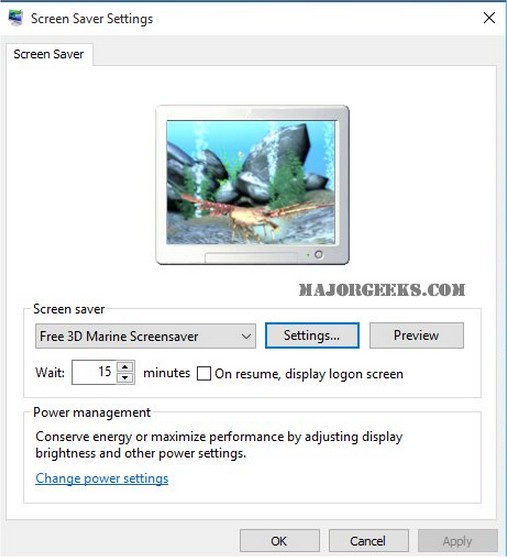


The original website that this screensaver program came from is long gone so there won’t be any support. There’s not a real lot going on here. You get the same scene over and over lasting about 30 seconds but then again I personally rarely sit and stare at my screen for no reason. Then again, some screen savers are more entertaining or interactive. Tough call here but it is completely free.

There are a lot of options for a Screensaver of this age. By default it will try to use your desktop settings but you can adjust the gamma so it is brighter or darker. You can see a clock in 2 different formats, show FPS and opt to exit on mouse movement. By default hitting any key or mouse click will exit. Volume control is included and the sound is just a piano.

3D Marine Screensaver seems to use a fair amount of CPU and memory by today's standards but then again, you’re not doing anything when it runs. Overall it’s best feature is that it’s free and not loaded with any additional software and it's more of a retro screensaver than anything else.

Download @ http://www.majorgeeks.com/files/details/3d_marine_screensaver.html


« Random Photo: Interpretation Varies · 3D Marine Screensaver Is a Retro Underwater Screensaver · FontViewer Will Access All Available Fonts on Your Machine »


Comments
comments powered by Disqus

MajorGeeks.Com » News » September 2015 » 3D Marine Screensaver Is a Retro Underwater Screensaver

© 2000-2026 MajorGeeks.com
Powered by Contentteller® Business Edition
