


Adult Player Delivers Ransomware
Posted by: Timothy Weaver on 05/30/16 10:37 am
[
 Comments
]
Comments
]
An adult app is making the rounds and delivering malware instead. Called the "Adult Player", this app delivers Cyber.Police ransomware.
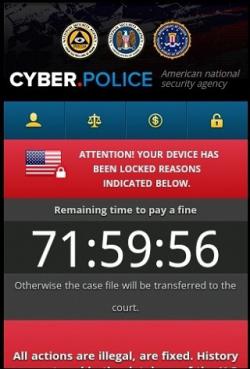
Cyber.Police
Attention! Your device has been locked reasons indicated below
Remaining time to pay a fine
71:59:56
Otherwise the case file will be transferred to the court
All actions are illegal, are fixed. History query stored in the database of the U.S. Department of Homeland Security
It goes on to tell the victim that it has found crimes that can be used to convict the user and result in jail time and hefty fines.
What to do? Pay the "fine" of $200 in iTunes cards.
Christopher Boyd, a malware intelligence analyst at Malwarebytes, explains:
"This is, of course, complete nonsense – no 'Treasury department' investigating supposed criminal activity can be bought off with iTunes gift codes. 'Cyber Police' Ransomware was most recently doing the rounds last month, and appears to have moved from exploit driven autoinstalls to 'please click on the thing' while hoping for the best. Malwarebytes Anti-Malware Mobile detects the above file as SLocker.cx, and you should most definitely avoid running the above file on your Android."
Source: Graham Cluley
Cyber.Police
Attention! Your device has been locked reasons indicated below
Remaining time to pay a fine
71:59:56
Otherwise the case file will be transferred to the court
All actions are illegal, are fixed. History query stored in the database of the U.S. Department of Homeland Security
It goes on to tell the victim that it has found crimes that can be used to convict the user and result in jail time and hefty fines.
What to do? Pay the "fine" of $200 in iTunes cards.
Christopher Boyd, a malware intelligence analyst at Malwarebytes, explains:
"This is, of course, complete nonsense – no 'Treasury department' investigating supposed criminal activity can be bought off with iTunes gift codes. 'Cyber Police' Ransomware was most recently doing the rounds last month, and appears to have moved from exploit driven autoinstalls to 'please click on the thing' while hoping for the best. Malwarebytes Anti-Malware Mobile detects the above file as SLocker.cx, and you should most definitely avoid running the above file on your Android."
Source: Graham Cluley
Comments
