


All You Need to Know About the WannaCrypt Ransomware
Posted by: Timothy Tibbetts on 05/16/17 07:29 am
[
 Comments
]
Comments
]
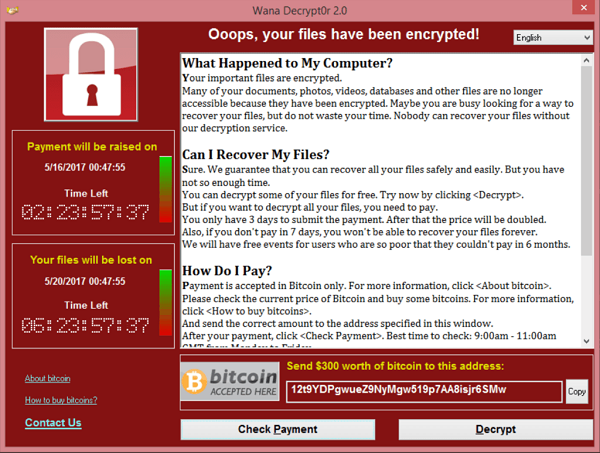
WannaCrypt is a ransomware program targeting older versions of Windows. Mostly affected are Windows XP, Vista, Server 2003, and 8. Windows 10 forces updates by default and Microsoft pushed out an update. On Friday, 12 May 2017, a large cyber-attack using it was launched, infecting more than 230,000 computers in 150 countries, demanding ransom payments in the cryptocurrency bitcoin in 28 languages.
Update: If you're not sure if you're patched, download Microsoft WannaCrypt Hotfix from MajorGeeks.
WannaCrypt was being spread primarily by phishing emails (most commonly links or attachments) and as a worm on unpatched systems.
The attack affected Telefónica and several other large companies in Spain, as well as parts of Britain's National Health Service, FedEx, Deutsche Bahn and LATAM Airlines. Other targets in at least 99 countries were also reported to have been attacked around the same time.
WannaCry is believed to use the EternalBlue exploit, which was developed by the U.S. National Security Agency (NSA) to attack computers running Microsoft Windows operating systems. Although a patch to remove the underlying vulnerability for supported systems (Windows Vista and later operating systems) had been issued on 14 March 2017, delays in applying security updates and lack of support by Microsoft of legacy versions of Windows left many users vulnerable. Due to the scale of the attack, to deal with the unsupported Windows systems and to contain the spread of the ransomware, Microsoft has taken the unusual step of releasing updates for all older unsupported operating systems from Windows XP onwards.
Shortly after the attack began, a researcher found an effective kill switch, which prevented many new infections and allowed time to patch systems. This significantly slowed the spread. It was later reported that new versions that lack the kill switch were detected. Cyber security experts also warn of a second wave of the attack due to such variants and the beginning of the new workweek.
As always, be sure your Windows is up to date. XP users should consider upgrading where possible. The vulnerabilities for that operating system will not go away. Don't click links in an email. Don't open file attachments.
And, our longest running advice; back up regularly. You can back up to the cloud, or another drive. Programs like Acronis True Image can clone your drive essentially restoring everything at any time.
Update: If you're not sure if you're patched, download Microsoft WannaCrypt Hotfix from MajorGeeks.
WannaCrypt was being spread primarily by phishing emails (most commonly links or attachments) and as a worm on unpatched systems.
The attack affected Telefónica and several other large companies in Spain, as well as parts of Britain's National Health Service, FedEx, Deutsche Bahn and LATAM Airlines. Other targets in at least 99 countries were also reported to have been attacked around the same time.
WannaCry is believed to use the EternalBlue exploit, which was developed by the U.S. National Security Agency (NSA) to attack computers running Microsoft Windows operating systems. Although a patch to remove the underlying vulnerability for supported systems (Windows Vista and later operating systems) had been issued on 14 March 2017, delays in applying security updates and lack of support by Microsoft of legacy versions of Windows left many users vulnerable. Due to the scale of the attack, to deal with the unsupported Windows systems and to contain the spread of the ransomware, Microsoft has taken the unusual step of releasing updates for all older unsupported operating systems from Windows XP onwards.
Shortly after the attack began, a researcher found an effective kill switch, which prevented many new infections and allowed time to patch systems. This significantly slowed the spread. It was later reported that new versions that lack the kill switch were detected. Cyber security experts also warn of a second wave of the attack due to such variants and the beginning of the new workweek.
As always, be sure your Windows is up to date. XP users should consider upgrading where possible. The vulnerabilities for that operating system will not go away. Don't click links in an email. Don't open file attachments.
And, our longest running advice; back up regularly. You can back up to the cloud, or another drive. Programs like Acronis True Image can clone your drive essentially restoring everything at any time.
Comments
