


Defence Crypto Allows Easy File Encryption
Posted by: Jon Ben-Mayor on 02/18/16 04:48 am
[
 Comments
]
Comments
]
Defence Crypto is a lightweight, user-friendly file encryptor that permits you to encrypt/decrypt almost any file with ease.
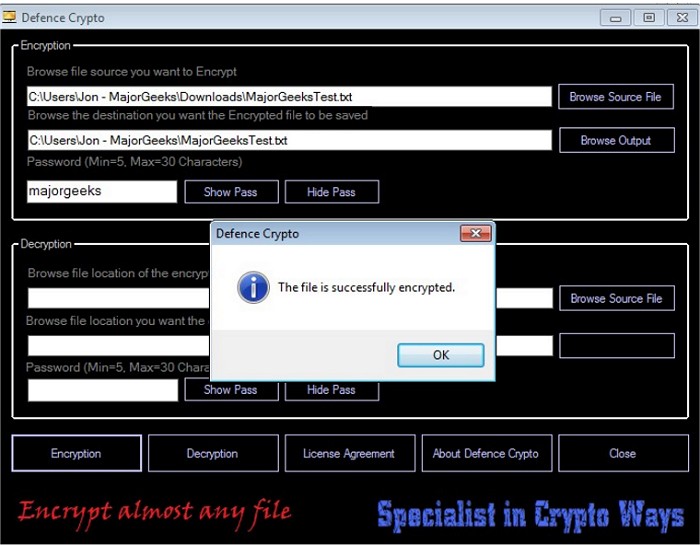
Defence Crypto allows you to select a personal password of 5-30 characters ensuring that the data you have encrypted stays private, but make sure to keep track of the password key you select or you'll be out of luck.
During our testing process we found the UI to be very easy to navigate through, and the process of encryption and decryption can be completed in minimal steps. Simply select a file, click encrypt/decrypt, and you're done. That said, it is probably a good idea to point out that this program does exactly what it claims - but just how secure it is should be left up to you and we make no specific claims pertaining to just how secure the encryption may or may not be. Do you want to encrypt the directions and passcodes to your secret gold vault? That is up to you. But it certainly works....
Download @ http://www.majorgeeks.com/files/details/defence_crypto.html
Defence Crypto allows you to select a personal password of 5-30 characters ensuring that the data you have encrypted stays private, but make sure to keep track of the password key you select or you'll be out of luck.
During our testing process we found the UI to be very easy to navigate through, and the process of encryption and decryption can be completed in minimal steps. Simply select a file, click encrypt/decrypt, and you're done. That said, it is probably a good idea to point out that this program does exactly what it claims - but just how secure it is should be left up to you and we make no specific claims pertaining to just how secure the encryption may or may not be. Do you want to encrypt the directions and passcodes to your secret gold vault? That is up to you.
But it certainly works....Download @ http://www.majorgeeks.com/files/details/defence_crypto.html
Comments
