


Facebook introduces 'embedded posts' to select few
Posted by: Jon Ben-Mayor on 07/31/13 10:50 am
[
 Comments
]
Comments
]
The embedded post feature that Facebook is rolling out works the same way as embedding a tweet or an Instagram photo on your blog or website; it allows you to copy a bit of code and add public Facebook posts.
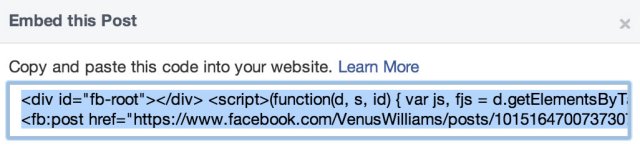
To add, click on the arrow on the top right of a post and select the "Embed Post" option. A box with embed code will appear, which you can paste into your website or blog.
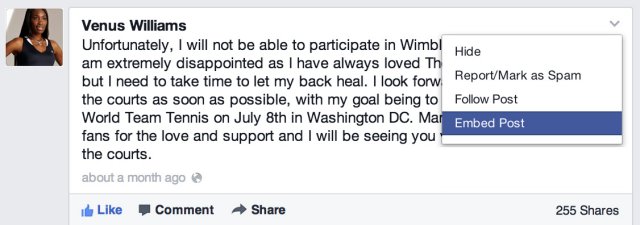
The option only works for public posts, which are designated by a globe next to the time stamp.
In perusing a few posts on the CNN and Huffington Post Facebook pages, it did not appear that the embed option was live just yet. But when it does appear, embedded posts will appear on your site just as they do on Facebook. Facebook users can then like or share a post directly from your site, like or follow the author of the shared post, or navigate to the original post on Facebook.
If an embedded post is made private after the fact, a message will inform people that the content is no longer available. At this point, there are no customization options; the size of the posts will be the same as they appear on Facebook.
To add, click on the arrow on the top right of a post and select the "Embed Post" option. A box with embed code will appear, which you can paste into your website or blog.
The option only works for public posts, which are designated by a globe next to the time stamp.
In perusing a few posts on the CNN and Huffington Post Facebook pages, it did not appear that the embed option was live just yet. But when it does appear, embedded posts will appear on your site just as they do on Facebook. Facebook users can then like or share a post directly from your site, like or follow the author of the shared post, or navigate to the original post on Facebook.
If an embedded post is made private after the fact, a message will inform people that the content is no longer available. At this point, there are no customization options; the size of the posts will be the same as they appear on Facebook.
Comments
