


Garmin goes heads up
Posted by: Jon on 07/08/13 08:09 am
[
 Comments
]
Comments
]
If you have used a GPS in your vehicle at any time, then you know the frustration of trying to make that silly little suction stick to the windshield when it is 80 degrees or more out, it is next to impossible. Then there is the little ring that forms on the windshield after you remove the contraption that houses that silly little suction cup that is basically like a poster that beckons would be thieves to; "please break window and steal my expensive stuff that might or might not be inside."

Also trying to place the bulky GPS unit on the windscreen impairs visibility and in some states you will end up with a ticket. Garmin seems to have solved some of this by eliminating having the unit mounted to the windshield and uses a projection of the image directly onto an invisible film.
Unlike the type of built in heads up display that can be purchased for a luxury vehicle, Garmin receives navigation information from your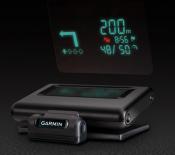 smartphone2 and projects it onto a transparent film on your windshield or an attached reflector lens. Get turn-by-turn directions to your destination for easy viewing while driving. HUD automatically adjusts its brightness level, so its projections are clearly visible in direct sunlight or at night.
The device offers far more navigation detail than other portable HUD systems, displaying turn indicators, distance to your next turn, current speed and speed limit and estimated time of arrival. HUD lets you know what lane to be in for your next maneuver, as well as alerts you if you exceed the speed limit. It even warns you of potential traffic delays and upcoming safety camera locations.
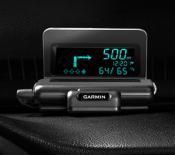 Simply place the transparent film on your windshield (or attach the included reflector lens), place HUD onto your vehicle’s dashboard, and pair it wirelessly with your compatible Bluetooth®-enabled smartphone. Using Garmin StreetPilot for iPhone, or NAVIGON for iPhone/Android/Windows Phone 8 (purchase may be required), choose your destination and HUD will project turn-by-turn directions to get you there. An integrated USB port on the vehicle power/adapter cable even makes it easy to charge your phone while you’re on the go.
This device has not been authorized as required by the rules of the Federal Communications Commission. This device is not, and may not be, offered for sale or lease, or sold or leased, until authorization is obtained.
Once that happens the unit will sell for about $129.00.
Also trying to place the bulky GPS unit on the windscreen impairs visibility and in some states you will end up with a ticket. Garmin seems to have solved some of this by eliminating having the unit mounted to the windshield and uses a projection of the image directly onto an invisible film.
Unlike the type of built in heads up display that can be purchased for a luxury vehicle, Garmin receives navigation information from your
smartphone2 and projects it onto a transparent film on your windshield or an attached reflector lens. Get turn-by-turn directions to your destination for easy viewing while driving. HUD automatically adjusts its brightness level, so its projections are clearly visible in direct sunlight or at night.The device offers far more navigation detail than other portable HUD systems, displaying turn indicators, distance to your next turn, current speed and speed limit and estimated time of arrival. HUD lets you know what lane to be in for your next maneuver, as well as alerts you if you exceed the speed limit. It even warns you of potential traffic delays and upcoming safety camera locations.
Simply place the transparent film on your windshield (or attach the included reflector lens), place HUD onto your vehicle’s dashboard, and pair it wirelessly with your compatible Bluetooth®-enabled smartphone. Using Garmin StreetPilot for iPhone, or NAVIGON for iPhone/Android/Windows Phone 8 (purchase may be required), choose your destination and HUD will project turn-by-turn directions to get you there. An integrated USB port on the vehicle power/adapter cable even makes it easy to charge your phone while you’re on the go. This device has not been authorized as required by the rules of the Federal Communications Commission. This device is not, and may not be, offered for sale or lease, or sold or leased, until authorization is obtained.
Once that happens the unit will sell for about $129.00.
Comments
