


Google Malicious Phishing Doc Suspended
Posted by: Timothy Weaver on 05/04/17 06:44 am
[
 Comments
]
Comments
]
There was a phishing email flooding the internet supposedly containing a Google Doc.
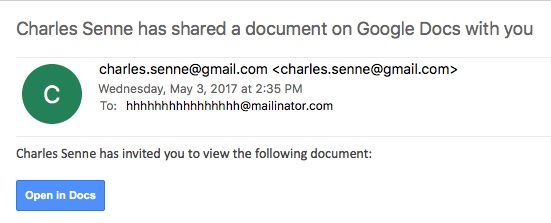
If a victim clicked on it, it redirected the user to a new site. Once the “Open in Docs” button is clicked, the victim is redirected to Google’s OAUTH2 service and the user is to allow the attacker’s malicious application, called “Google Docs,” below, to access their Google account and related services, including contacts, Gmail, Docs and more.
A Google spokesperson told Threatpost that: “We have taken action to protect users against an email impersonating Google Docs, and have disabled offending accounts. We’ve removed the fake pages, pushed updates through Safe Browsing, and our abuse team is working to prevent this kind of spoofing from happening again. We encourage users to report phishing emails in Gmail.”
Once the attacker gains access to the victims account, it sends more phishing emails to all of their contacts.
“Considering how indiscriminate the targeting is, it doesn’t seem to be anything else but trying to exploit a weakness in how end users can be tricked into granting access to their Google accounts,” said Alvaro Hoyos, CISO at OneLogin.
Eric Hodge of Cyber Scout says: “Google has a systemic issue. Its OAUTH processes are subject to fakery and therefore phishing attacks. The question is will Google address the issue systemically (adding TLS certificate servers for individuals) or will they just try to address this particular attack?”
Source: Threat Post
If a victim clicked on it, it redirected the user to a new site. Once the “Open in Docs” button is clicked, the victim is redirected to Google’s OAUTH2 service and the user is to allow the attacker’s malicious application, called “Google Docs,” below, to access their Google account and related services, including contacts, Gmail, Docs and more.
A Google spokesperson told Threatpost that: “We have taken action to protect users against an email impersonating Google Docs, and have disabled offending accounts. We’ve removed the fake pages, pushed updates through Safe Browsing, and our abuse team is working to prevent this kind of spoofing from happening again. We encourage users to report phishing emails in Gmail.”
Once the attacker gains access to the victims account, it sends more phishing emails to all of their contacts.
“Considering how indiscriminate the targeting is, it doesn’t seem to be anything else but trying to exploit a weakness in how end users can be tricked into granting access to their Google accounts,” said Alvaro Hoyos, CISO at OneLogin.
Eric Hodge of Cyber Scout says: “Google has a systemic issue. Its OAUTH processes are subject to fakery and therefore phishing attacks. The question is will Google address the issue systemically (adding TLS certificate servers for individuals) or will they just try to address this particular attack?”
Source: Threat Post
Comments
