


Google strategist refuses to speak in front of small crowd
Posted by: Jon Ben-Mayor on 05/08/14 02:29 am
[
 Comments
]
Comments
]
A Google strategist, whom pretty much invited himself to a conference in San Francisco, refused to give the keynote speech after seeing that the crowd was not as big as expected.
 Scott Jenson stormed from the Marriott on Fisherman's Wharf in San Francisco after seeing the small crowd, witnesses to the internal technical malfunction say that Jensen told the woman at the Internet of Things Expo registration desk: "I am Google."
According to ReadWrite, Mr. Jenson gave a brief explanation of his decision to walk out by saying: 'I do not speak to small groups.'
Google's published Code of Conduct tells employees that the company’s "don't be evil" motto is "about doing the right thing more generally—following the law, acting honorably and treating each other with respect." Unless of course there are not many of you - then all bets are off!
Google and Jenson—who are, in Jenson's mind, apparently the same entity—did not respond to requests for comment.
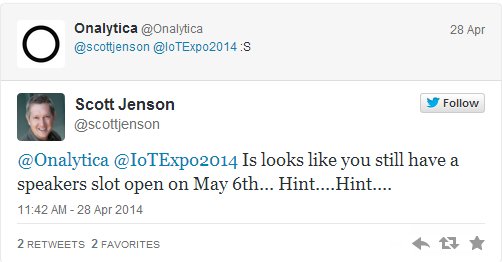
Scott Jenson stormed from the Marriott on Fisherman's Wharf in San Francisco after seeing the small crowd, witnesses to the internal technical malfunction say that Jensen told the woman at the Internet of Things Expo registration desk: "I am Google."According to ReadWrite, Mr. Jenson gave a brief explanation of his decision to walk out by saying: 'I do not speak to small groups.'
Google's published Code of Conduct tells employees that the company’s "don't be evil" motto is "about doing the right thing more generally—following the law, acting honorably and treating each other with respect." Unless of course there are not many of you - then all bets are off!
Google and Jenson—who are, in Jenson's mind, apparently the same entity—did not respond to requests for comment.
Comments
