


HR Departments New Target for Ransomware
Posted by: Timothy Weaver on 01/04/17 10:01 am
[
 Comments
]
Comments
]
Ransomware authors are now targeting Human Resource administrators in an effort to extract ransoms from corporations.
 The spam emails are disguised as job applications with two attachments. The main body of the "application" only contains a brief message. HR departments are used to opening emails from job applicants and attachments that would usually contain a resume.
However, the attachments in this campaign carry the GoldenEye ransomware family, which is the offspring of Petya and Mischa. One attachment carries a PDF as a cover letter meant to trick the victim in believing the email is legitimate. It is the second attachment that carries the malware: a macro-enabled Excel file.
If the victim enables the macro, the ransomware starts encrypting files. “This action makes it impossible to access any files on the hard disk. While the disk undergoes encryption, the victim sees a fake “chkdsk” screen, as in previous Petya variants,” Check Point security researchers explain.
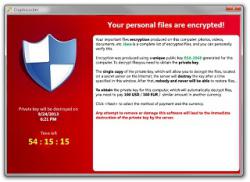
The ransom note directs the victim to a Dark Web portal where they can enter a “personal decryption code” to pay the ransom. The criminals also help the victim with a support page incase the victim has issues with the payment or decryption process.
At this time, the criminals are demanding a 1.3 bitcoin ransom. It could vary depending on the value of a bitcoin at the time. It is assumed that the criminals are looking to gain a $1,000 ransom.
Source: Security Week
The spam emails are disguised as job applications with two attachments. The main body of the "application" only contains a brief message. HR departments are used to opening emails from job applicants and attachments that would usually contain a resume.However, the attachments in this campaign carry the GoldenEye ransomware family, which is the offspring of Petya and Mischa. One attachment carries a PDF as a cover letter meant to trick the victim in believing the email is legitimate. It is the second attachment that carries the malware: a macro-enabled Excel file.
If the victim enables the macro, the ransomware starts encrypting files. “This action makes it impossible to access any files on the hard disk. While the disk undergoes encryption, the victim sees a fake “chkdsk” screen, as in previous Petya variants,” Check Point security researchers explain.
The ransom note directs the victim to a Dark Web portal where they can enter a “personal decryption code” to pay the ransom. The criminals also help the victim with a support page incase the victim has issues with the payment or decryption process.
At this time, the criminals are demanding a 1.3 bitcoin ransom. It could vary depending on the value of a bitcoin at the time. It is assumed that the criminals are looking to gain a $1,000 ransom.
Source: Security Week
Comments
