


Instant File Searcher Professional Can Quickly Find Files, Folders and More
Posted by: Jon Ben-Mayor on 05/25/17 02:38 am
[
 Comments
]
Comments
]
Instant File Searcher Professional is a search engine for files and folders on your computer with many options and context menu search.
Some of the options you can use to narrow down your search include a filename, or part of it, date and time, creation date, modification date, folders and more. You can also narrow your search down to pre-selected categories including audio, video, pictures, documents, icons and more. Further options include whether you want to search files, folders, all directories, system and hidden files, size, and similar and exact names.
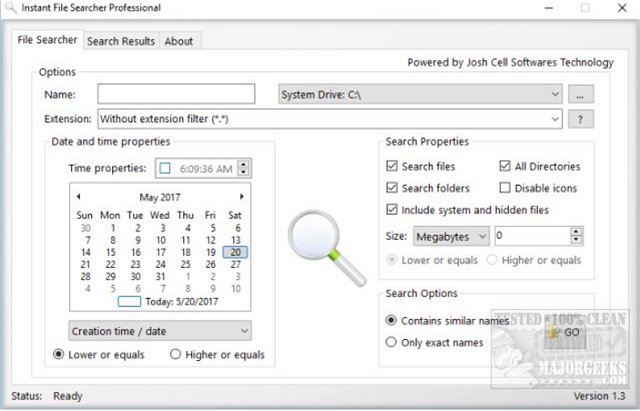
Once you have your results, you can export the list and right-click on any file to access whatever context menu options you have.
Instant File Searcher Professional takes searching for files and folders on any drive to a whole new level with plenty of options to narrow down your search. Just remember to take advantage of this and narrow down your search, so you get the best results. Instant File Searcher Professional's numerous ways of searching the drive must be used and are the only downside to the app.
Instant File Searcher Professional is portable and only 415 KB so there's no risk to trying it out; if you don't like it, just delete it.
Download @ http://www.majorgeeks.com/files/details/instant_file_searcher_professional.html
Some of the options you can use to narrow down your search include a filename, or part of it, date and time, creation date, modification date, folders and more. You can also narrow your search down to pre-selected categories including audio, video, pictures, documents, icons and more. Further options include whether you want to search files, folders, all directories, system and hidden files, size, and similar and exact names.
Once you have your results, you can export the list and right-click on any file to access whatever context menu options you have.
Instant File Searcher Professional takes searching for files and folders on any drive to a whole new level with plenty of options to narrow down your search. Just remember to take advantage of this and narrow down your search, so you get the best results. Instant File Searcher Professional's numerous ways of searching the drive must be used and are the only downside to the app.
Instant File Searcher Professional is portable and only 415 KB so there's no risk to trying it out; if you don't like it, just delete it.
Download @ http://www.majorgeeks.com/files/details/instant_file_searcher_professional.html
Comments
