


Is your AV software running?
Posted by: Timothy Weaver on 11/13/14 06:13 am
[
 Comments
]
Comments
]
Do you have AV software installed? You might say "Of course, it came with the computer." However, most preinstalled AV programs require renewal in three or six months.
Microsoft's Tim Rains revealed in a blog post that systems "protected" by an expired or out-of-date antivirus are almost as prone to infection as systems with no antivirus at all. What happens depends on the software. Some automatically downgrade to their free version. Some stop getting updates and others just stop working at all.
Microsoft's Malicious Software Removal Tool (MSRT) runs on every PC during regular Patch Tuesday updates. This software returns results to Microsoft. What the researchers have found is that MSRT reports the brand of antivirus protection installed (if any), whether that antivirus has expired, and whether antivirus signatures are up to date. Here are the numbers.
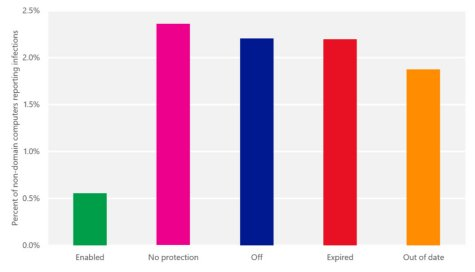
Microsoft researchers determined that the MSRT removed malware from 0.6 percent of computers that have an active, correctly-configured antivirus installed.
The percentage of infected PCs with no antivirus at all was considerably greater—2.4 percent.
PCs with antivirus protection present but disabled, they found 2.2 percent infected. That was also the percentage of systems with expired protection.
When the antivirus wasn't expired but antivirus definitions were out of date, the infection rate was 1.9 percent.
Microsoft's Tim Rains revealed in a blog post that systems "protected" by an expired or out-of-date antivirus are almost as prone to infection as systems with no antivirus at all. What happens depends on the software. Some automatically downgrade to their free version. Some stop getting updates and others just stop working at all.
Microsoft's Malicious Software Removal Tool (MSRT) runs on every PC during regular Patch Tuesday updates. This software returns results to Microsoft. What the researchers have found is that MSRT reports the brand of antivirus protection installed (if any), whether that antivirus has expired, and whether antivirus signatures are up to date. Here are the numbers.
Microsoft researchers determined that the MSRT removed malware from 0.6 percent of computers that have an active, correctly-configured antivirus installed.
The percentage of infected PCs with no antivirus at all was considerably greater—2.4 percent.
PCs with antivirus protection present but disabled, they found 2.2 percent infected. That was also the percentage of systems with expired protection.
When the antivirus wasn't expired but antivirus definitions were out of date, the infection rate was 1.9 percent.
Comments
