


Kostopoulos Web Browser: Browsing Made Simple
Posted by: Jon Ben-Mayor on 09/16/17 01:14 am
[
 Comments
]
Comments
]
The title of this little write-up made me think of how bloated and overly complex some other browsers have become over the years. This makes this simple and fast browser a breath of fresh air for sure.
Kostopoulos Web Browser is a minimalist web browser designed specifically to make browsing the web as simple as possible.
Now, we add Kostopoulos Web Browser to the mix. Its strong suit is simplicity. Think of it as a web browser for children, or senior citizens who just want to surf the web. You're going to love it or hate it when you first start it up. It has large icons at the top using numerous colors. By design, however, this is to make it easy to use. There is a search and website address field as well as the usual buttons including back, forward, refresh, stop, load, home page, and settings.
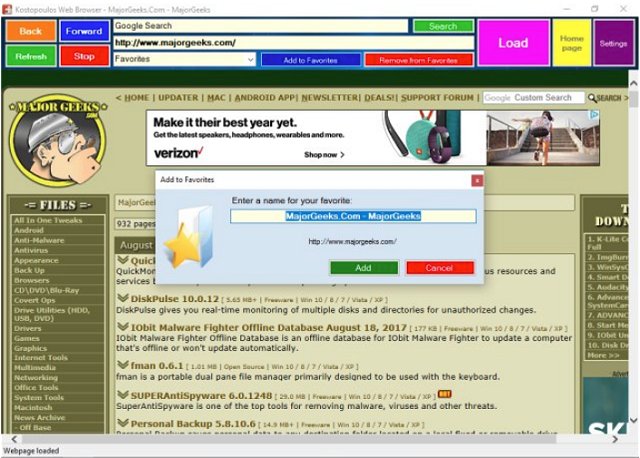
Settings allow you to manage your favorites, set your home page as well as darken the screen when dangerous websites are blocked. Appearance lets you choose from 5 themes or disable them entirely. Frankly, it's hardly noticeable and pointless in a browser designed to be minimalist, so we disabled it.
We found it averaged 100MB of memory on average and while it spiked our CPU while in use, it used nothing once a website was loaded. We noticed a slightly less CPU spike with the themes disabled.
Kostopoulos Web Browser isn't for everyone, certainly not power users but it does work well for simplicity. We'd like to see a portable version rather than the old school installer it comes with.
Regardless, if you need a browser geared towards someone with little PC experience or who finds web browsers confusing, then give Kostopoulos Web Browser a try.
Download @ http://www.majorgeeks.com/files/details/kostopoulos_web_browser.html
Kostopoulos Web Browser is a minimalist web browser designed specifically to make browsing the web as simple as possible.
Now, we add Kostopoulos Web Browser to the mix. Its strong suit is simplicity. Think of it as a web browser for children, or senior citizens who just want to surf the web. You're going to love it or hate it when you first start it up. It has large icons at the top using numerous colors. By design, however, this is to make it easy to use. There is a search and website address field as well as the usual buttons including back, forward, refresh, stop, load, home page, and settings.
Settings allow you to manage your favorites, set your home page as well as darken the screen when dangerous websites are blocked. Appearance lets you choose from 5 themes or disable them entirely. Frankly, it's hardly noticeable and pointless in a browser designed to be minimalist, so we disabled it.
We found it averaged 100MB of memory on average and while it spiked our CPU while in use, it used nothing once a website was loaded. We noticed a slightly less CPU spike with the themes disabled.
Kostopoulos Web Browser isn't for everyone, certainly not power users but it does work well for simplicity. We'd like to see a portable version rather than the old school installer it comes with.
Regardless, if you need a browser geared towards someone with little PC experience or who finds web browsers confusing, then give Kostopoulos Web Browser a try.
Download @ http://www.majorgeeks.com/files/details/kostopoulos_web_browser.html
Comments
