


Microsoft Steps in to Tackle TeslaCrypt Ransomware
Posted by: Timothy Weaver on 10/16/15 04:41 am
[
 Comments
]
Comments
]
Microsoft has updated its Malicious Software Removal Tool in order to protect against Tescrypt infections.
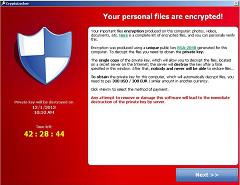 Tescrypt spiked in August according to Microsoft. Prior to August, it's prevalence was "steady but low," and after they spiked later in the month, detections fell but remained “higher than before that first peak in late August.”
Tescrypt is a form of ransomware. It is most prevalent in the U.S. at 39%, the U.K. at 7% and Canada at 6%.
In some instances, the MSRT cannot remove the infection so users are directed to use the Windows Defender Offline to restore a PC.
One difference with Tescrypt is that it tends to target video game files. But as Microsoft notes, what separates TeslaCrypt from other ransomware is that it also targets files related to financial and tax software.
After an infection, TeslaCrypt searches for specific file types and then encrypts them with AES 256 encryption and demands payment in Bitcoin in exchange for a key to unlock the files.
Source: ZDNet
Tescrypt spiked in August according to Microsoft. Prior to August, it's prevalence was "steady but low," and after they spiked later in the month, detections fell but remained “higher than before that first peak in late August.”Tescrypt is a form of ransomware. It is most prevalent in the U.S. at 39%, the U.K. at 7% and Canada at 6%.
In some instances, the MSRT cannot remove the infection so users are directed to use the Windows Defender Offline to restore a PC.
One difference with Tescrypt is that it tends to target video game files. But as Microsoft notes, what separates TeslaCrypt from other ransomware is that it also targets files related to financial and tax software.
After an infection, TeslaCrypt searches for specific file types and then encrypts them with AES 256 encryption and demands payment in Bitcoin in exchange for a key to unlock the files.
Source: ZDNet
Comments
