


New hard to detect malware discovered in PNG image files
Posted by: Timothy Tibbetts on 02/06/14 01:46 am
[
 Comments
]
Comments
]
ThreatPost says that researchers have discovered a relatively new way to distribute malware that relies on reading JavaScript code stored in an obfuscated PNG file’s metadata to trigger iFrame injections.
You see, the iFrame was loading a valid file, nothing malicious, it was a JavaScript file, jquery.js. For all intents and purposed, the file was good. Here, look for yourself:
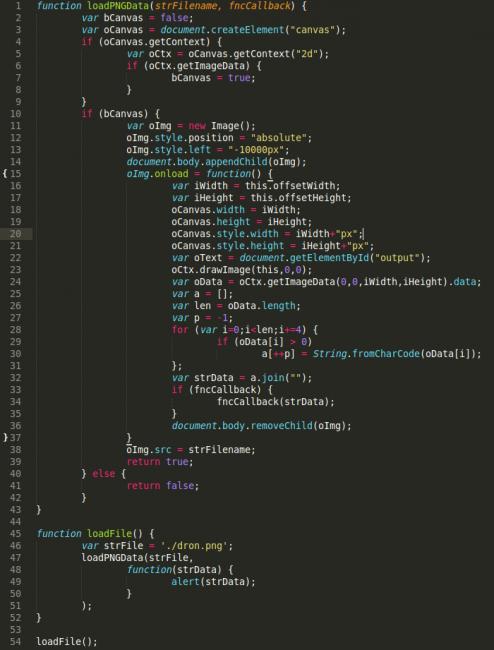
This is unique because in the level of effort being taken to obfuscate the payload. Most scanners today will not decode the meta in the image, they would stop at the JavaScript that is being loaded, but they won’t follow the cookie trail. This also talks to the benefit, at least for attackers, it’s exceptionally difficult to detect.
Do make note however that while in this specific case we’re talking about PNG, the concepts do and can apply to other image file types as well. This only puts more emphasis on the importance of being aware of the state of your web server, understanding what files are and aren’t being added and modified and ensuring that vulnerabilities are not being exploited.
Further details available at http://blog.sucuri.net/2014/02/new-iframe-injections-leverage-png-image-metadata.html
You see, the iFrame was loading a valid file, nothing malicious, it was a JavaScript file, jquery.js. For all intents and purposed, the file was good. Here, look for yourself:
This is unique because in the level of effort being taken to obfuscate the payload. Most scanners today will not decode the meta in the image, they would stop at the JavaScript that is being loaded, but they won’t follow the cookie trail. This also talks to the benefit, at least for attackers, it’s exceptionally difficult to detect.
Do make note however that while in this specific case we’re talking about PNG, the concepts do and can apply to other image file types as well. This only puts more emphasis on the importance of being aware of the state of your web server, understanding what files are and aren’t being added and modified and ensuring that vulnerabilities are not being exploited.
Further details available at http://blog.sucuri.net/2014/02/new-iframe-injections-leverage-png-image-metadata.html
Comments
