


New on MajorGeeks: GFXplorer
Posted by: Jon Ben-Mayor on 02/03/16 04:09 am
[
 Comments
]
Comments
]
GFXplorer can give you all of your system information in detail including Windows, CPU, RAM, video, audio, drivers and much more.
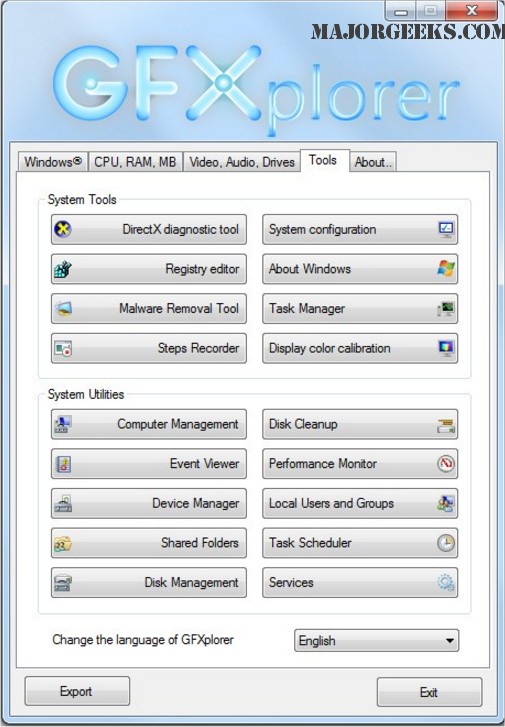
Typically when you’re looking to get system information, there’s a good reason for it. GFXplorer includes a final tab with shortcuts to malware removal tools, Task Manager, Services and more for a total of about 18 Windows tools that should point you in the right direction for whatever your problem may be.
GFXplorer functions via a tabs based user interface with various useful categories available, you can export all the information in plain text file (TXT) or Rich Text file (RTF) format to be viewed at a later time for a more detailed analysis. Additionally, it provides you with access to multiple Windows utilities directly from the 'tools tab' allowing for quick maintenance.
For a tech, this one has the details, small size and shortcuts to make it worth taking with you.
Download @ http://www.majorgeeks.com/files/details/gfxplorer.html
Typically when you’re looking to get system information, there’s a good reason for it. GFXplorer includes a final tab with shortcuts to malware removal tools, Task Manager, Services and more for a total of about 18 Windows tools that should point you in the right direction for whatever your problem may be.
GFXplorer functions via a tabs based user interface with various useful categories available, you can export all the information in plain text file (TXT) or Rich Text file (RTF) format to be viewed at a later time for a more detailed analysis. Additionally, it provides you with access to multiple Windows utilities directly from the 'tools tab' allowing for quick maintenance.
For a tech, this one has the details, small size and shortcuts to make it worth taking with you.
Download @ http://www.majorgeeks.com/files/details/gfxplorer.html
Comments
