


New on MajorGeeks: Resource Hacker
Posted by: Jon Ben-Mayor on 05/09/15 03:43 am
[
 Comments
]
Comments
]
View, modify, rename, add, delete and extract resources in 32bit & 64bit Windows executables and resource files (*.res).
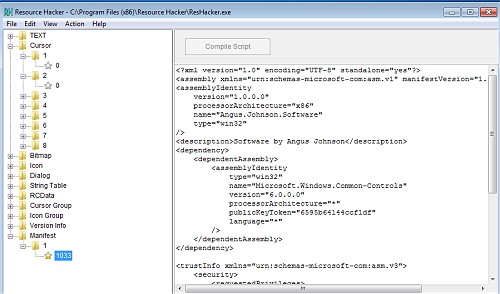
Viewing Resources: Cursor, Icon, Bitmap, GIF, AVI, and JPG resource images can be viewed. WAV and MIDI audio resources can be played.
Saving Resources: Resources can be saved as image files (*.ico, *.bmp etc), as script files (*.rc), as binary resource files (*.res), or as untyped binary files (*.bin).
Modifying Resources: Resources can be modified by replacing the resource with a resource located in another file (*.ico, *.bmp, *.res etc) or by using the internal resource script compiler (for menus, dialogs etc).
Adding Resources: Resources can be added to an application by copying them from external resource files (*.res).
Deleting Resources: Most compilers add resources into applications which are never used by the application. Removing unused resources can reduce an application's size.
This software is not to be used in any way to illegally modify software.
Download @ http://www.majorgeeks.com/files/details/resource_hacker.html
Viewing Resources: Cursor, Icon, Bitmap, GIF, AVI, and JPG resource images can be viewed. WAV and MIDI audio resources can be played.
Saving Resources: Resources can be saved as image files (*.ico, *.bmp etc), as script files (*.rc), as binary resource files (*.res), or as untyped binary files (*.bin).
Modifying Resources: Resources can be modified by replacing the resource with a resource located in another file (*.ico, *.bmp, *.res etc) or by using the internal resource script compiler (for menus, dialogs etc).
Adding Resources: Resources can be added to an application by copying them from external resource files (*.res).
Deleting Resources: Most compilers add resources into applications which are never used by the application. Removing unused resources can reduce an application's size.
This software is not to be used in any way to illegally modify software.
Download @ http://www.majorgeeks.com/files/details/resource_hacker.html
Comments
