


New on MajorGeeks: RunAsTool
Posted by: Jon Ben-Mayor on 11/01/15 02:43 am
[
 Comments
]
Comments
]
RunAsTool allows you to run specific programs with administrator privileges - but the nice thing is that you can perform this without the need to enter the administrator password each time - saving you keystrokes.
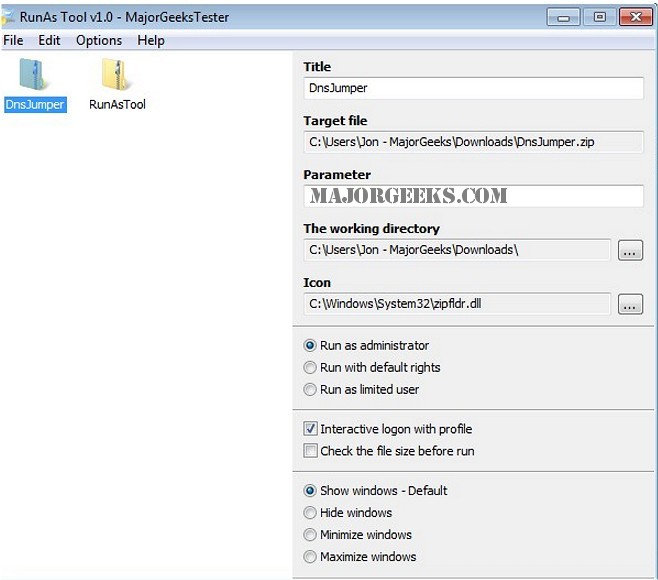
Under restricted Account , Some programs are missing administrator rights to run correctly , therefore Many users are working under administrator account , this makes the system vulnerable to malware, spyware, viruses and other security risks with RunAsTool you can change it.
Since installation is not a requirement, you can just drop the program anywhere on the hard disk and run the executable file directly. Otherwise, you can save RunAsTool to a USB flash drive or similar storage unit, and run it on any computer. Therefore, you can carry the app with you whenever you’re on the move.
The login information for the application like username and password are read from an encrypted file – You don’t have to worry about your Admin Password.
Download @ http://www.majorgeeks.com/files/details/runastool.html
Under restricted Account , Some programs are missing administrator rights to run correctly , therefore Many users are working under administrator account , this makes the system vulnerable to malware, spyware, viruses and other security risks with RunAsTool you can change it.
Since installation is not a requirement, you can just drop the program anywhere on the hard disk and run the executable file directly. Otherwise, you can save RunAsTool to a USB flash drive or similar storage unit, and run it on any computer. Therefore, you can carry the app with you whenever you’re on the move.
The login information for the application like username and password are read from an encrypted file – You don’t have to worry about your Admin Password.
Download @ http://www.majorgeeks.com/files/details/runastool.html
Comments
