


New Ransomware Verbally Informs the Victim of Encryption
Posted by: Timothy Weaver on 03/09/16 07:10 am
[
 Comments
]
Comments
]
Cerber ransomware, first detected by independent malware analysts BiebsMalwareGuy and MeegulWorth, verbally informs its victims that it has encrypted their files.
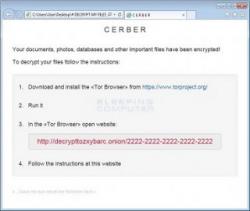 The encryption method is AES encryption and demands a ransom of 1.24 Bitcoin. Once encryption is completed, the malware generates three ransom notes. One of the notes allows the computer to verbally read out the extortion message to victims in one of 12 different languages supported by the ransomware.
Graham Cluely said: “The fact that Cerber has the ability to target network shares, not to mention its decryptor's compatibility with 12 different languages, attests to the increasing sophistication of today's ransomware campaigns. It is therefore recommended that users maintain regular backups of their data, that they avoid clicking on suspicious link, and that they maintain an updated anti-virus solution on their machines.”
The malware will not infect a system that comes from an eastern European country.
Source: SCMagazine
The encryption method is AES encryption and demands a ransom of 1.24 Bitcoin. Once encryption is completed, the malware generates three ransom notes. One of the notes allows the computer to verbally read out the extortion message to victims in one of 12 different languages supported by the ransomware.Graham Cluely said: “The fact that Cerber has the ability to target network shares, not to mention its decryptor's compatibility with 12 different languages, attests to the increasing sophistication of today's ransomware campaigns. It is therefore recommended that users maintain regular backups of their data, that they avoid clicking on suspicious link, and that they maintain an updated anti-virus solution on their machines.”
The malware will not infect a system that comes from an eastern European country.
Source: SCMagazine
Comments
