


Notepad3 Provides Fast Scintilla-Based Text Editing and More
Posted by: Jon Ben-Mayor on 12/08/17 02:34 am
[
 Comments
]
Comments
]
Notepad3 is a fast Scintilla-based text editor that permits simple programming tasks and can be used as a replacement for the default Windows text editor.
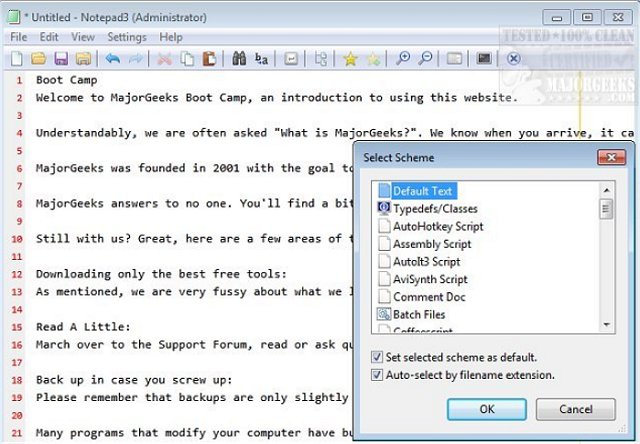
It also includes support for syntax highlighting, ASP, assembly language, AutoHotkey, AutoIt3, AviSynth, Bash, BAT, C, C++, C#, CMake, CoffeeScript, Common Gateway Interface (CGI), Cascading Style Sheets (CSS), DIFF, HTML, INF, INI, Inno Setup, Java, JavaScript, LaTeX, Lua, Markdown, NSIS, Pascal, Perl, PHP, as well as numerous others. And it has improved support for NFO ANSI art.
Notepad3 includes a large array of features and options like auto-completion for words, bookmark support, code folding, word occurrence marking, and case conversion. It also can perform powerful find and replace with regular expression support, some line manipulation tools, extended clipboard, and a zoom tool. There is also the option to set Notepad3 to be always on top, and it offers transparent window support making it a solid choice for replacing the default Windows Notepad.
Download @ http://www.majorgeeks.com/files/details/notepad3.html
It also includes support for syntax highlighting, ASP, assembly language, AutoHotkey, AutoIt3, AviSynth, Bash, BAT, C, C++, C#, CMake, CoffeeScript, Common Gateway Interface (CGI), Cascading Style Sheets (CSS), DIFF, HTML, INF, INI, Inno Setup, Java, JavaScript, LaTeX, Lua, Markdown, NSIS, Pascal, Perl, PHP, as well as numerous others. And it has improved support for NFO ANSI art.
Notepad3 includes a large array of features and options like auto-completion for words, bookmark support, code folding, word occurrence marking, and case conversion. It also can perform powerful find and replace with regular expression support, some line manipulation tools, extended clipboard, and a zoom tool. There is also the option to set Notepad3 to be always on top, and it offers transparent window support making it a solid choice for replacing the default Windows Notepad.
Download @ http://www.majorgeeks.com/files/details/notepad3.html
Comments
