


Panasonic introduces an Android based smartphone handset for home
Posted by: Timothy Tibbetts on 07/30/13 06:43 am
[
 Comments
]
Comments
]
Panasonic has announced a new product in its premium range of Digital Cordless Phones: KX-PRX120, which has a smartphone style handset.
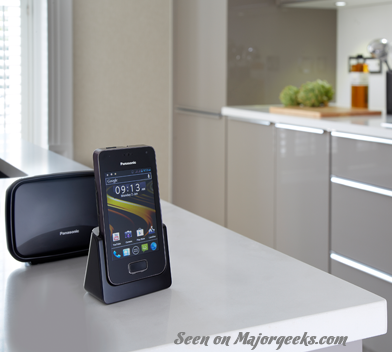 The KX-PRX120 digital cordless phone will run on the Android operating system allowing users to enjoy various options for communicating in addition to conventional voice communication via the landline. The Android 4.0, Ice Cream Sandwich offers an advanced telephone experience at home. In addition to the DECT interface, there is a Wi-Fi / Bluetooth interface on the handset. The KX-PRX120 is available with an answering machine and has been designed to be lightweight, compact and easy to carry. One can receive incoming landline calls in and around the house as far as the DECT signal will reach. The comfortable size of the touch screen also enables a more intuitive and comfortable operation of the device.
Access to Google Play with Android 4.0 Ice Cream Sandwich
The KX-PRX platform is based on Android 4.0, Ice Cream Sandwich and supports Google Play which enables users to download their favourite applications, access their social networks, or share a photo album with family and friends.
Panasonic’s new KX-PRX120 can be used as a video phone thanks to the built-in front camera enabling users to enjoy video communication via Skype
Packed with Features
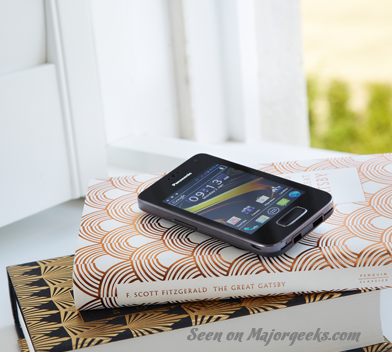 Packed within the small and slim, yet stylish design of the KX-PRX120 are a host of innovative features that make managing calls easier than ever, including:
• 3.5 inch TFT colour LCD (HVGA) with capacitive multi-touch screen
• Wi-Fi, Bluetooth, GPS
• 0.3M pixel Front Camera
• 1450mAh Li-ion Battery
• microSD / microSDHC Card Slot on Handset
• micro USB Charging Port
• Incoming/Outgoing Call Barring to help minimize unwanted or nuisance calls
• Caller ID, Caller ID memory
• Answering Machine (40min)
• Key Finder accessory (Optional)
• Up to 6 handsets (Optional handset or GAP supported DECT handset) can be registered
Not a bad idea at all for those with land-lines still in place; not bad at all!
The KX-PRX120 digital cordless phone will run on the Android operating system allowing users to enjoy various options for communicating in addition to conventional voice communication via the landline. The Android 4.0, Ice Cream Sandwich offers an advanced telephone experience at home. In addition to the DECT interface, there is a Wi-Fi / Bluetooth interface on the handset. The KX-PRX120 is available with an answering machine and has been designed to be lightweight, compact and easy to carry. One can receive incoming landline calls in and around the house as far as the DECT signal will reach. The comfortable size of the touch screen also enables a more intuitive and comfortable operation of the device.Access to Google Play with Android 4.0 Ice Cream Sandwich
The KX-PRX platform is based on Android 4.0, Ice Cream Sandwich and supports Google Play which enables users to download their favourite applications, access their social networks, or share a photo album with family and friends.
Panasonic’s new KX-PRX120 can be used as a video phone thanks to the built-in front camera enabling users to enjoy video communication via Skype
Packed with Features
Packed within the small and slim, yet stylish design of the KX-PRX120 are a host of innovative features that make managing calls easier than ever, including:• 3.5 inch TFT colour LCD (HVGA) with capacitive multi-touch screen
• Wi-Fi, Bluetooth, GPS
• 0.3M pixel Front Camera
• 1450mAh Li-ion Battery
• microSD / microSDHC Card Slot on Handset
• micro USB Charging Port
• Incoming/Outgoing Call Barring to help minimize unwanted or nuisance calls
• Caller ID, Caller ID memory
• Answering Machine (40min)
• Key Finder accessory (Optional)
• Up to 6 handsets (Optional handset or GAP supported DECT handset) can be registered
Not a bad idea at all for those with land-lines still in place; not bad at all!
Comments
