


Pull Details About Registered Domains With WhoisCL
Posted by: Jon Ben-Mayor on 10/29/17 01:39 am
[
 Comments
]
Comments
]
WhoisCL is a command-line utility for obtaining details about registered domains.
It is set up to automatically connect to the correct WHOIS server (according to the top-level domain name) and promptly retrieve the WHOIS record for the target domain.
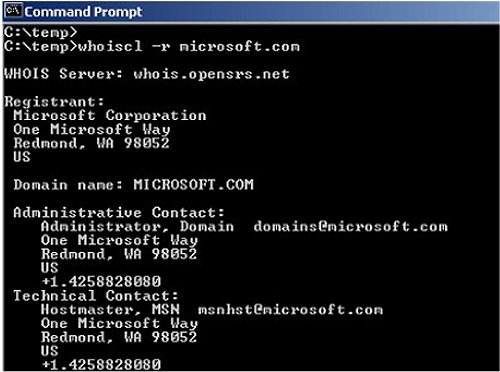
WhoisCL supports both generic domains and country code domains. You can additionally create a personalized WHOIS servers list to override the default servers defined by this utility.
If you want to use this feature, the instructions are outlined below:
Create a file named 'whois-servers.txt' in the same folder of WhoisCL.exe
Add the needed servers to the list. Each line should contain the domain extension, a space character, and then the whois server address.
For example:
gov whois.nic.gov
com rs.internic.net
il whois.isoc.org.il
ir whois.nic.ir
The next time that you run WhoisCL, the specified servers will be used instead of the default servers list stored in WhoisCL. Be aware that WhoisCL only supports WHOIS servers in port 43. It doesn't support Web-based WHOIS requests.
Below you will find details for using WhoisCL:
WhoisCL [-r] [-n] [-socks4] [-socks5] Domain
[-r] If you specify this option, the top remark lines of the WHOIS record are automatically removed.
[-n] If you specify this option, WhoisCL will get the correct WHOIS server from xx.whois-servers.net, instead of using the internal WHOIS servers list.
[-socks4] Specifies SOCKS4 proxy to use, in IPAddress:Port format
[-socks5] Specifies SOCKS5 proxy to use, in IPAddress:Port format
Domain Domain name.
Examples:
WhoisCL microsoft.com
WhoisCL -r google.com
WhoisCL -n w3c.org
WhoisCL -socks4 192.168.0.55:1080 nirsoft.net
WhoisCL -socks5 192.168.10.55:9980 facebook.com
Download @ http://www.majorgeeks.com/files/details/whoiscl.html
It is set up to automatically connect to the correct WHOIS server (according to the top-level domain name) and promptly retrieve the WHOIS record for the target domain.
WhoisCL supports both generic domains and country code domains. You can additionally create a personalized WHOIS servers list to override the default servers defined by this utility.
If you want to use this feature, the instructions are outlined below:
For example:
gov whois.nic.gov
com rs.internic.net
il whois.isoc.org.il
ir whois.nic.ir
Below you will find details for using WhoisCL:
WhoisCL [-r] [-n] [-socks4] [-socks5] Domain
[-r] If you specify this option, the top remark lines of the WHOIS record are automatically removed.
[-n] If you specify this option, WhoisCL will get the correct WHOIS server from xx.whois-servers.net, instead of using the internal WHOIS servers list.
[-socks4] Specifies SOCKS4 proxy to use, in IPAddress:Port format
[-socks5] Specifies SOCKS5 proxy to use, in IPAddress:Port format
Domain Domain name.
Examples:
WhoisCL microsoft.com
WhoisCL -r google.com
WhoisCL -n w3c.org
WhoisCL -socks4 192.168.0.55:1080 nirsoft.net
WhoisCL -socks5 192.168.10.55:9980 facebook.com
Download @ http://www.majorgeeks.com/files/details/whoiscl.html
Comments
