


RansomStopper Helps Detect, Prevent Multiple Ransomware Strains
Posted by: Jon Ben-Mayor on 12/25/17 01:21 am
[
 Comments
]
Comments
]
RansomStopper is an easy-to-use tool that is designed to detect and stop existing and new ransomware for any user.
The interface is attractive and easy to use. A tutorial and FAQ is available under the question mark icon. You will see four large buttons at the bottom - Allowed, Blocked & Quarantined, Security Alerts, and Check for Updates. There is no "About" in this section, something that is common in most apps. That said, you can find out what version you're running after it checks for updates.
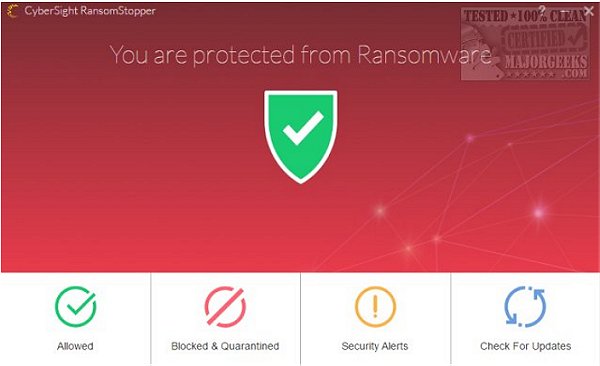
"Allowed" has a list of whitelisted items. On our clean install of Windows 10, the only thing on the list was Dropbox, which we didn't have installed. You can remove anything you like, but be aware at the time of this review; there's no warning or verification. Click "Remove," and it's simply gone and you return to the main window.
"Blocked" lists anything that was blocked. Again, you can remove anything that has been added, but you want to allow.
"Security Alerts" will notify you of anything that has recently occurred.
RansomStopper is free for personal use. Business licenses are available and include email alerting,
Group Policy (White List/Black List), file back-ups, centralized administration, Windows Servers 08, 12, and 16 support and reports.
Overall, we like what RansomStoper does and how simple it is to use. There are a few things that bother us as mentioned in the review but we're going to give them a chance and see if they address our concerns. Still, it's nice knowing you can block known and possibly unknown ransomware and have full control over false positives.
Download @ http://www.majorgeeks.com/files/details/ransomstopper.html
The interface is attractive and easy to use. A tutorial and FAQ is available under the question mark icon. You will see four large buttons at the bottom - Allowed, Blocked & Quarantined, Security Alerts, and Check for Updates. There is no "About" in this section, something that is common in most apps. That said, you can find out what version you're running after it checks for updates.
"Allowed" has a list of whitelisted items. On our clean install of Windows 10, the only thing on the list was Dropbox, which we didn't have installed. You can remove anything you like, but be aware at the time of this review; there's no warning or verification. Click "Remove," and it's simply gone and you return to the main window.
"Blocked" lists anything that was blocked. Again, you can remove anything that has been added, but you want to allow.
"Security Alerts" will notify you of anything that has recently occurred.
RansomStopper is free for personal use. Business licenses are available and include email alerting,
Group Policy (White List/Black List), file back-ups, centralized administration, Windows Servers 08, 12, and 16 support and reports.
Overall, we like what RansomStoper does and how simple it is to use. There are a few things that bother us as mentioned in the review but we're going to give them a chance and see if they address our concerns. Still, it's nice knowing you can block known and possibly unknown ransomware and have full control over false positives.
Download @ http://www.majorgeeks.com/files/details/ransomstopper.html
Comments
