


Solve the Windows 10 DPI Scaling Issue With Windows 10 DPI Fix
Posted by: Jon Ben-Mayor on 10/25/2015 02:52 AM
[
 Comments
]
Comments
]
As we all know the DPI scaling in Windows 10 is messed up, when you choose a specific scaling mode, it doesn't apply it to all apps / screens so you get some apps with blurry fonts as if you were running a non-native resolution.
For instance, when you have a widescreen, with a resolution of 1920x1080 or higher or a bit lower, in Windows Vista, 7, 8 and 8.1 you would put your DPI scaling to 125% or higher to make text and images appear larger and more easy to read.
But when you put the DPI scaling to 125% in Windows 10, you see in a lot of dialogs and windows the font gets very blurry. It does not matter if you are using the regular or custom Windows DPI scaling functions at your 'Screen properties'. Text will get blurry on 125%. You can test if you have this bug also if you put your DPI scaling to 125% at your 'Screen properties', then reboot Windows (or sign in again when it asks you). Then goto 'Control panel > Administrative tools > Services'.
If you have this issue also you would see the titlebar of the Services window has a font scaled good. But the services list itself is very blurry/unsharp to read.
At some point we will understand why they changed the DPI scaling in Windows 10. One can only assume that it is probably meant to support mobile devices more easy. But if you like to use your Desktop as a Desktop, and you demand high quality only. Then you can use this fix until Microsoft addresses this issue fully.
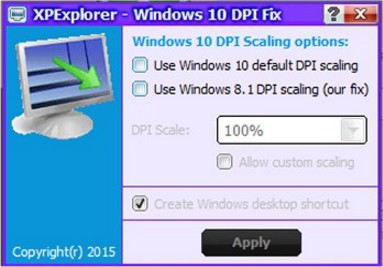
This fix simply tells Windows 10 to use the original DPI scaling as it was in Windows Vista, 7, 8 and 8.1.
Windows 10 DPI Fix proves to be a useful tool for making the DPI Scaling in Windows 10 work just like it used to in Windows 8.
Download @ http://www.majorgeeks.com/files/details/windows_10_dpi_fix.html
For instance, when you have a widescreen, with a resolution of 1920x1080 or higher or a bit lower, in Windows Vista, 7, 8 and 8.1 you would put your DPI scaling to 125% or higher to make text and images appear larger and more easy to read.
But when you put the DPI scaling to 125% in Windows 10, you see in a lot of dialogs and windows the font gets very blurry. It does not matter if you are using the regular or custom Windows DPI scaling functions at your 'Screen properties'. Text will get blurry on 125%. You can test if you have this bug also if you put your DPI scaling to 125% at your 'Screen properties', then reboot Windows (or sign in again when it asks you). Then goto 'Control panel > Administrative tools > Services'.
If you have this issue also you would see the titlebar of the Services window has a font scaled good. But the services list itself is very blurry/unsharp to read.
At some point we will understand why they changed the DPI scaling in Windows 10. One can only assume that it is probably meant to support mobile devices more easy. But if you like to use your Desktop as a Desktop, and you demand high quality only. Then you can use this fix until Microsoft addresses this issue fully.
This fix simply tells Windows 10 to use the original DPI scaling as it was in Windows Vista, 7, 8 and 8.1.
Windows 10 DPI Fix proves to be a useful tool for making the DPI Scaling in Windows 10 work just like it used to in Windows 8.
Download @ http://www.majorgeeks.com/files/details/windows_10_dpi_fix.html
Comments
