


Web Browser Extensions and AddOns Revamped
Posted by: Timothy Tibbetts on 09/13/20 04:07 am
[
 Comments
]
Comments
]
After a few long days of hard work, we have revamped the extensions and addon categories on MajorGeeks.
On MajorGeeks, you could choose from the Firefox Addons or Google Chrome Extensions categories. Google Chrome became the broader category, with numerous subcategories. Rather than continue to add addons and extensions separately, we modified the Google Chrome category and subcategories and named it Extensions & Add-Ons For All Browsers.
Over the past four days, we went through every single extension and addon, moved them to the new categories, deleted old categories, combined and or added any other supported browsers, and finally, deleted any extensions or addons that are no longer available or supported (about 40).
For example, the Dark Reader Extension was listed for Chrome and Firefox on two different pages. Now you can download Dark Reader for Chrome, Firefox, Edge, and Safari on one page.
The best part about this is that we can now add many more extensions for everybody. Once we completed the revamp, we discovered we have plenty of room to add hundreds, if not thousands of high-quality extensions and addons.
We hope you like the changes (because it's too late) 🤣
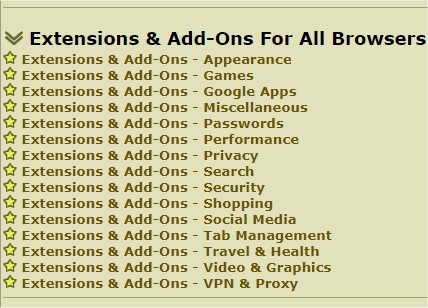
On MajorGeeks, you could choose from the Firefox Addons or Google Chrome Extensions categories. Google Chrome became the broader category, with numerous subcategories. Rather than continue to add addons and extensions separately, we modified the Google Chrome category and subcategories and named it Extensions & Add-Ons For All Browsers.
Over the past four days, we went through every single extension and addon, moved them to the new categories, deleted old categories, combined and or added any other supported browsers, and finally, deleted any extensions or addons that are no longer available or supported (about 40).
For example, the Dark Reader Extension was listed for Chrome and Firefox on two different pages. Now you can download Dark Reader for Chrome, Firefox, Edge, and Safari on one page.
The best part about this is that we can now add many more extensions for everybody. Once we completed the revamp, we discovered we have plenty of room to add hundreds, if not thousands of high-quality extensions and addons.
We hope you like the changes (because it's too late) 🤣
Comments
