


Brave Browser's New Search Re-Ranking: A Smarter Way to Search the Web
By Corporal Punishmenton 01/23/2025 |
If you've ever felt like search engines are prioritizing ads or irrelevant results over genuinely helpful information, the latest Brave Browser has an innovative solution. With its new "Search Re-Ranking" feature, Brave is changing how we interact with search engines. By applying advanced algorithms and a privacy-first approach, Brave helps users find more accurate, relevant search results faster and without bias. This new feature has something for anyone looking to gain control of their search results.
Search Re-Ranking refines the search results by analyzing and reordering them based on their actual relevance, usefulness, and quality. Unlike traditional search engines that prioritize paid ads or SEO tricks, Brave applies its ranking layer to improve results.
But here's where it gets interesting: users play a key role in improving search results. Brave gives you the power to influence the re-ranking process using a simple thumbs-up or thumbs-down mechanism on individual search results. This user feedback helps Brave refine its algorithms, tailoring the results to better match what users find helpful. You find the controls on the little slider icon next to the settings gear. (See screenshot)
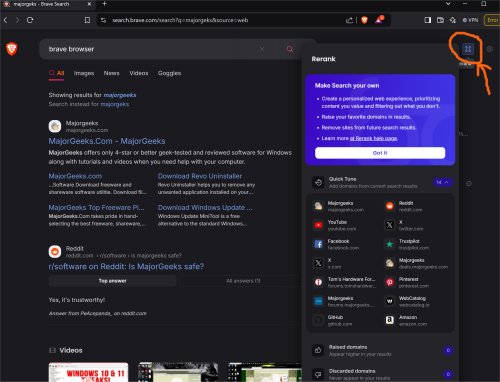
While this feature enhances personalization, Brave remains committed to privacy. The feedback you provide is stored locally on your device, ensuring it never leaves your control or is shared with third parties.
One of Brave's core principles has always been privacy, and Search Re-Ranking is no exception. Unlike other search engines that track your searches and store your data, Brave handles the re-ranking process entirely locally on your device. This means your searches remain private—Brave never logs or monitors what you're looking for.
For everyday users, this privacy-first approach means you can trust that the search results are unbiased and uninfluenced by advertising dollars. For tech enthusiasts, it's a fascinating example of how AI and user-driven data can improve search accuracy without compromising security.
Brave's new feature is a great addition for anyone tired of sifting through irrelevant or clickbait-style search results. By cutting through the noise, Search Re-Ranking helps you find exactly what you're looking for without wasting time or scrolling endlessly. Here are a few highlights of what makes this feature so valuable:
Relevance Over Revenue: Brave prioritizes results that answer your question, not those that earn advertisers money.
User-Driven Feedback: The thumbs-up/thumbs-down feature lets you actively shape better search results.
Privacy-Centric Design: User feedback and re-ranking happen locally, keeping your data safe and private.
Cross-Platform Functionality: Brave's re-ranking isn't limited to its search engine. It can also improve results from Google, Bing, and others.
Faster, Cleaner Searches: You get more accurate results without scrolling through ads or irrelevant links.
Tech enthusiasts will appreciate the AI-powered intelligence behind the scenes, as Brave evaluates content quality, relevance, and reliability while incorporating user feedback into the mix. It's an elegant blend of technology and user-focused design.
Trying Brave's Search Re-Ranking is simple. Just download the Brave Browser from MajorGeeks and start searching. The feature is enabled by default, but to get the most out of it, consider using the thumbs-up/thumbs-down feature to refine your results. Whether you're browsing on your computer, smartphone, or tablet, you'll enjoy a smoother, smarter search experience.
Brave Browser's Search Re-Ranking is more than just a feature; it's a smarter, privacy-first way to navigate the web. By combining AI with user feedback, Brave ensures your search results are relevant and shaped by what you find genuinely helpful.Whether you're a casual user who wants faster, cleaner searches or a tech enthusiast intrigued by Brave's innovative approach, this feature makes browsing the internet a better experience for everyone.
Why settle for search engines that prioritize profit over precision? Give Brave Browser a try today, and see how Search Re-Ranking transforms the way you browse.
comments powered by Disqus
How Brave's Search Re-Ranking Works
Search Re-Ranking refines the search results by analyzing and reordering them based on their actual relevance, usefulness, and quality. Unlike traditional search engines that prioritize paid ads or SEO tricks, Brave applies its ranking layer to improve results.
But here's where it gets interesting: users play a key role in improving search results. Brave gives you the power to influence the re-ranking process using a simple thumbs-up or thumbs-down mechanism on individual search results. This user feedback helps Brave refine its algorithms, tailoring the results to better match what users find helpful. You find the controls on the little slider icon next to the settings gear. (See screenshot)
While this feature enhances personalization, Brave remains committed to privacy. The feedback you provide is stored locally on your device, ensuring it never leaves your control or is shared with third parties.
Smarter Searches Without Compromising Privacy
One of Brave's core principles has always been privacy, and Search Re-Ranking is no exception. Unlike other search engines that track your searches and store your data, Brave handles the re-ranking process entirely locally on your device. This means your searches remain private—Brave never logs or monitors what you're looking for.
For everyday users, this privacy-first approach means you can trust that the search results are unbiased and uninfluenced by advertising dollars. For tech enthusiasts, it's a fascinating example of how AI and user-driven data can improve search accuracy without compromising security.
Why Search Re-Ranking Is a Big Deal
Brave's new feature is a great addition for anyone tired of sifting through irrelevant or clickbait-style search results. By cutting through the noise, Search Re-Ranking helps you find exactly what you're looking for without wasting time or scrolling endlessly. Here are a few highlights of what makes this feature so valuable:
How to Get Started
Trying Brave's Search Re-Ranking is simple. Just download the Brave Browser from MajorGeeks and start searching. The feature is enabled by default, but to get the most out of it, consider using the thumbs-up/thumbs-down feature to refine your results. Whether you're browsing on your computer, smartphone, or tablet, you'll enjoy a smoother, smarter search experience.
The Takeaway
Brave Browser's Search Re-Ranking is more than just a feature; it's a smarter, privacy-first way to navigate the web. By combining AI with user feedback, Brave ensures your search results are relevant and shaped by what you find genuinely helpful.Whether you're a casual user who wants faster, cleaner searches or a tech enthusiast intrigued by Brave's innovative approach, this feature makes browsing the internet a better experience for everyone.
Why settle for search engines that prioritize profit over precision? Give Brave Browser a try today, and see how Search Re-Ranking transforms the way you browse.
comments powered by Disqus
