


Code 32 - A Driver (Service) for This Device Has Been Disabled
By Timothy Tibbettson 06/20/2023 |
If you're receiving the Code 32 - A Driver (Service) for This Device Has Been Disabled, here's how you can fix it.
The secret here is the word Service. This error means that for whatever reason, a Service was expected to start, and it didn't.
1: Update Your Drivers
Updating your device drivers should do the trick enabling the Service again. We'd try Driver Booster first, reboot, and see if your problem is solved.
2: Remove and Reinstall the Device
Press the Windows Key + S and begin typing in device manager and click on device manager. Windows 7 users can go to Start, Control Panel as well. Find the hardware that's giving you trouble. For this example, we'll use Realtek High Definition Audio. Right-click and select Uninstall.
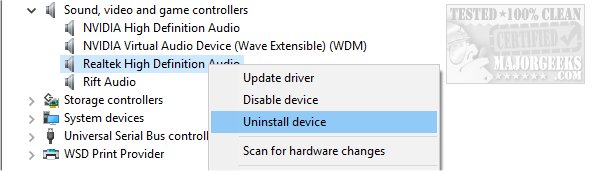
You will receive a warning that says You are about to uninstall this device from your system. Also, check the box that says Delete the driver software for this device.
Reboot after Windows is finished. Windows will not redetect and reinstall the device you removed. You might want to update your drivers now with Driver Booster.
If you have a different Device Manager error code, here are all the device manager error codes and solutions.
comments powered by Disqus
The secret here is the word Service. This error means that for whatever reason, a Service was expected to start, and it didn't.
1: Update Your Drivers
Updating your device drivers should do the trick enabling the Service again. We'd try Driver Booster first, reboot, and see if your problem is solved.
2: Remove and Reinstall the Device
Press the Windows Key + S and begin typing in device manager and click on device manager. Windows 7 users can go to Start, Control Panel as well. Find the hardware that's giving you trouble. For this example, we'll use Realtek High Definition Audio. Right-click and select Uninstall.
You will receive a warning that says You are about to uninstall this device from your system. Also, check the box that says Delete the driver software for this device.
Reboot after Windows is finished. Windows will not redetect and reinstall the device you removed. You might want to update your drivers now with Driver Booster.
If you have a different Device Manager error code, here are all the device manager error codes and solutions.
comments powered by Disqus
