


How to Download Wordle and Play for Free
By Timothy Tibbettson 06/15/2023 |
Wordle is a viral word game that came out of nowhere and became an internet sensation, so much so that the NY Times purchased it for low seven figures (over a million dollars). We hope to see the game remain free in the future, and even better, an app for iOS and Android, but as of this writing, the future of Wordle remains in question.
One option you have is to download the game.
Video tutorial:
Head to the Wordle website.
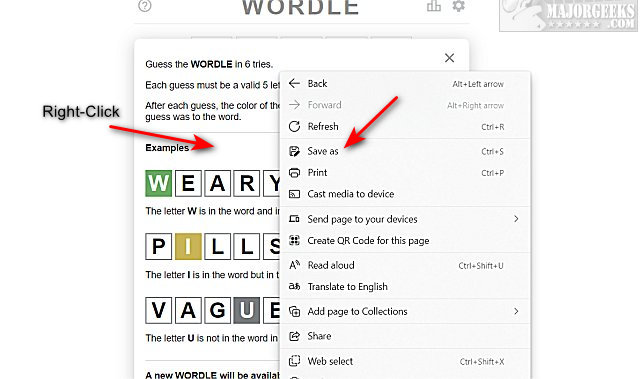
Right-click on the game and click on Save as.
When you save the game, it will need to be in a folder to hold additional files, so creating a new folder first would be best.
Go to the folder you saved the game in, and double click on Wordle - A daily word game.html.
You can still play a new puzzle every day and share your scores with your friends. There are some downsides to be expected. You will be starting over losing any progress you have at this point.
Have fun!
As discussed, we hope to see some development, including apps or keeping the game free.
Similar:
20 Hidden Google Games You Can Play Right Now
A Guide to Discovering Indie Games
How to Find and Use Easter Eggs on Your Computer
comments powered by Disqus
One option you have is to download the game.
Head to the Wordle website.
Right-click on the game and click on Save as.
When you save the game, it will need to be in a folder to hold additional files, so creating a new folder first would be best.
Go to the folder you saved the game in, and double click on Wordle - A daily word game.html.
You can still play a new puzzle every day and share your scores with your friends. There are some downsides to be expected. You will be starting over losing any progress you have at this point.
Have fun!
As discussed, we hope to see some development, including apps or keeping the game free.
Similar:
comments powered by Disqus
