


Efficiently Recover Lost Data with Eassos Recovery Free
By Timothy Tibbettson 12/24/2022 |
Eassos Recovery Free enables you to perform data recovery for files and partitions is a simple-to-navigate manner.
Eassos Recovery Free will permit you to recover lost data due to deletion, formatting, RAW drive, missing partition, virus infection, etc. you can use it to recover files and partitions from PC, laptop, SSD, USB drive, digital cameras, cellphones, etc. It supports the recovery from all types of files, such as photos, videos, audios, documents, emails, archives, etc. Eassos Recovery Free can also be utilized to recover deleted files from an emptied Recycle Bin, data loss due to a software crash, formatting or hard drive damage, and partition loss.
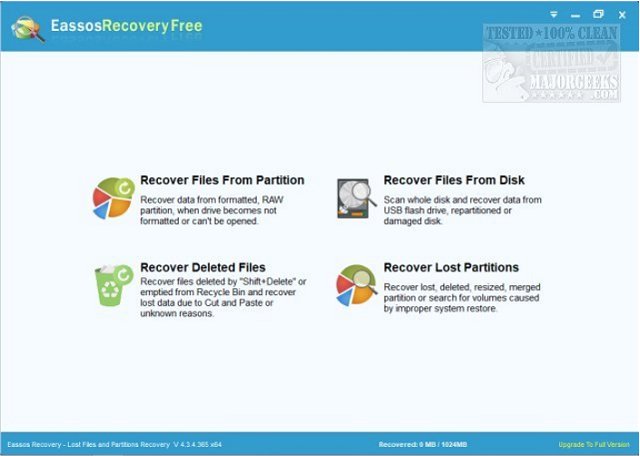
Eassos Recovery Free is set up to be as simple as possible to use, allowing any skill level of user to recover lost data in a few mouse-clicks. The interface is purpose driven without a ton of additional options available - just straight and to the point. It does include a File preview option that helps to determine the chance of successful recovery and allows users to find exactly what they want to restore even if a file name is no longer available.
There are four options for recovery displayed in the middle of the interface:
Recover Files From Partition – recover data from formatted, RAW or inaccessible partitions
Recover Lost Partitions – recover deleted or missing partitions and restore the partition table
Recover Files From Disk – Recover files and partition from damaged and unallocated disk
Recover Deleted Files – recover deleted files from empty Recycle Bin and removable devices
Eassos Recovery Free supports IDE, SCSI, and SATA hard disks, USB flash disk, memory cards, external hard drive, virtual disk, etc.
As with many data recovery tools, you should not install to the location from where you need to recover the data.
Download @ https://www.majorgeeks.com/files/details/eassos_recovery_free.html
comments powered by Disqus
Eassos Recovery Free will permit you to recover lost data due to deletion, formatting, RAW drive, missing partition, virus infection, etc. you can use it to recover files and partitions from PC, laptop, SSD, USB drive, digital cameras, cellphones, etc. It supports the recovery from all types of files, such as photos, videos, audios, documents, emails, archives, etc. Eassos Recovery Free can also be utilized to recover deleted files from an emptied Recycle Bin, data loss due to a software crash, formatting or hard drive damage, and partition loss.
Eassos Recovery Free is set up to be as simple as possible to use, allowing any skill level of user to recover lost data in a few mouse-clicks. The interface is purpose driven without a ton of additional options available - just straight and to the point. It does include a File preview option that helps to determine the chance of successful recovery and allows users to find exactly what they want to restore even if a file name is no longer available.
There are four options for recovery displayed in the middle of the interface:
Recover Files From Partition – recover data from formatted, RAW or inaccessible partitions
Recover Lost Partitions – recover deleted or missing partitions and restore the partition table
Recover Files From Disk – Recover files and partition from damaged and unallocated disk
Recover Deleted Files – recover deleted files from empty Recycle Bin and removable devices
Eassos Recovery Free supports IDE, SCSI, and SATA hard disks, USB flash disk, memory cards, external hard drive, virtual disk, etc.
As with many data recovery tools, you should not install to the location from where you need to recover the data.
Download @ https://www.majorgeeks.com/files/details/eassos_recovery_free.html
comments powered by Disqus
