


Embracing Virtue with Opera GX's Redeem My Soul Feature
By Corporal Punishmenton 03/13/2024 |
Opera GX is tailored for gamers. It features CPU and RAM limiters, Twitch and Discord integration, and a GX Corner for gaming news.
But it is not just for gamers. We have been recommending Opera GX for some time and have included it in our Top Freeware Picks as a default browser. It's a top pick not only for its features but also because Opera GX makes surfing fun again.
In that vein, I stumbled on a feature called "Redeem My Soul" that made me laugh so hard I had to share. If activated, Redeem My Soul, AKA Fake My History, will assume you are dead..or at least dead to Opera after 14 days of inactivity.
It then replaces your true browsing history with a curated, innocuous one-after feature, ensuring your browser history showcases only the most saintly internet explorations upon your extended absence (or presumed digital demise).
Imagine, in the event of your passing, leaving behind a legacy of noble searches and educational deep dives rather than your infomercial binges, endless meme spirals, and random fact-checking that probably had you on a watch list someplace. Opera GX has your back, swapping any dubious digital breadcrumbs for a gleaming trail of virtuous ventures.
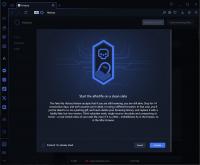
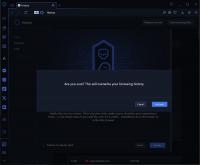
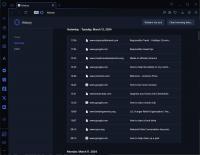
To Opt-in, go to "History" and look for the "Redeem My Soul Button," then choose to Activate. Or, if you want to be a more righteous geek immediately, click the "Pretend I'm Already Dead" box to instantly swap your boring suspect links to things like "How to clean up a park," "How to start a book club," and "Responsible travel" for an instant reputation overhaul!
In all seriousness, occasionally clearing your browser history is a solid plan for personal data control, ensuring sensitive information isn't accessible on shared devices. Additionally, your history can reveal personal habits and routines, making you predictable, allowing profiling based on interests or affiliations, and even facilitating targeted scams.
Setting up a 14-day KILL switch (see what I did there? Kill... dead...) is a good plan, especially for machines you might use often. It ensures sensitive information is not left vulnerable if you forget to clear it manually. So this is a fun way to do that.
Is it easier to set the browser to delete history when it is closed? Yes.
Is it way funnier to get people to think you embody altruism and selflessness to the point of canonization? Hell, yes!
If you want to, Download Opera GX here and give it a try; I hope you get a giggle out of it as we did.

comments powered by Disqus
But it is not just for gamers. We have been recommending Opera GX for some time and have included it in our Top Freeware Picks as a default browser. It's a top pick not only for its features but also because Opera GX makes surfing fun again.
In that vein, I stumbled on a feature called "Redeem My Soul" that made me laugh so hard I had to share. If activated, Redeem My Soul, AKA Fake My History, will assume you are dead..or at least dead to Opera after 14 days of inactivity.
It then replaces your true browsing history with a curated, innocuous one-after feature, ensuring your browser history showcases only the most saintly internet explorations upon your extended absence (or presumed digital demise).
Imagine, in the event of your passing, leaving behind a legacy of noble searches and educational deep dives rather than your infomercial binges, endless meme spirals, and random fact-checking that probably had you on a watch list someplace. Opera GX has your back, swapping any dubious digital breadcrumbs for a gleaming trail of virtuous ventures.
To Opt-in, go to "History" and look for the "Redeem My Soul Button," then choose to Activate. Or, if you want to be a more righteous geek immediately, click the "Pretend I'm Already Dead" box to instantly swap your boring suspect links to things like "How to clean up a park," "How to start a book club," and "Responsible travel" for an instant reputation overhaul!
In all seriousness, occasionally clearing your browser history is a solid plan for personal data control, ensuring sensitive information isn't accessible on shared devices. Additionally, your history can reveal personal habits and routines, making you predictable, allowing profiling based on interests or affiliations, and even facilitating targeted scams.
Setting up a 14-day KILL switch (see what I did there? Kill... dead...) is a good plan, especially for machines you might use often. It ensures sensitive information is not left vulnerable if you forget to clear it manually. So this is a fun way to do that.
Is it easier to set the browser to delete history when it is closed? Yes.
Is it way funnier to get people to think you embody altruism and selflessness to the point of canonization? Hell, yes!
If you want to, Download Opera GX here and give it a try; I hope you get a giggle out of it as we did.
comments powered by Disqus
