


Executor Provides a Customizable Alternative to Windows Run
By Timothy Tibbettson 06/15/2023 |
Executor is set up to be a fully customizable alternative to Windows Run that will enable you to enjoy a personalized multi-purpose launcher and more.
The program was designed to alleviate searching for applications from the start menu. This way of searching may not be an issue for all, but those that have a large number of things in the start menu will surely agree that having to scroll through mass amounts of programs, etc., can be quite time-consuming. This streamlining of your work process is the area where Executor comes into its own by giving you a way to launch programs quickly but also by helping optimize your daily workflow.
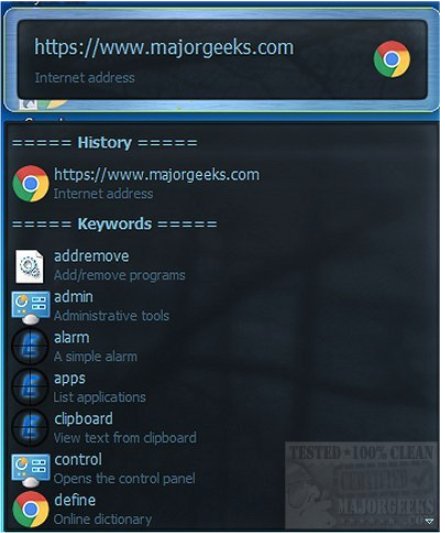
Executor can be set up with various skins and layouts, and operation modes all of which will depend on what you like or need. You can configure it to display keyword-based suggestions, strings, and more. All entries are quickly searched for as soon as you begin entering in the search area of the app, and it will filter results and provide suggestions as you go. A simple double-click will launch your target app, Windows context menu as well as open a folder, copy full path, etc. And while not is use, Executor sites down in the systray permitting quick deployment. Once you have Executor configured to your work habits and needs it will be a great asset in making the workday flow.
Executor includes so many features so check out the full listing that is available here.
Download @ https://www.majorgeeks.com/files/details/executor.html
comments powered by Disqus
The program was designed to alleviate searching for applications from the start menu. This way of searching may not be an issue for all, but those that have a large number of things in the start menu will surely agree that having to scroll through mass amounts of programs, etc., can be quite time-consuming. This streamlining of your work process is the area where Executor comes into its own by giving you a way to launch programs quickly but also by helping optimize your daily workflow.
Executor can be set up with various skins and layouts, and operation modes all of which will depend on what you like or need. You can configure it to display keyword-based suggestions, strings, and more. All entries are quickly searched for as soon as you begin entering in the search area of the app, and it will filter results and provide suggestions as you go. A simple double-click will launch your target app, Windows context menu as well as open a folder, copy full path, etc. And while not is use, Executor sites down in the systray permitting quick deployment. Once you have Executor configured to your work habits and needs it will be a great asset in making the workday flow.
Executor includes so many features so check out the full listing that is available here.
Download @ https://www.majorgeeks.com/files/details/executor.html
comments powered by Disqus
