


File Explorer or Windows Explorer Crashes or Freezes
By Timothy Tibbettson 07/05/2023 |
Is your Windows Explorer File Explorer crashing or freezing especially if you right-click on it? The problem might be an often overlooked issue with one of your Context Menu items.
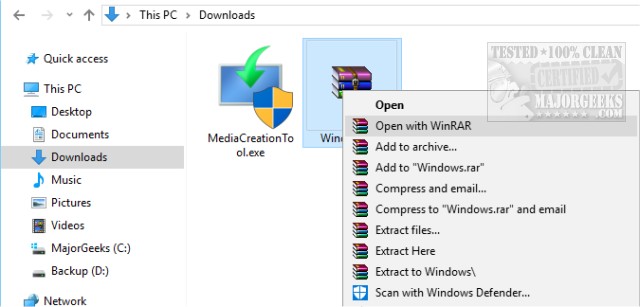
There is a good chance that an application you installed added what is known as a “shell extension” or "Context menu" item, and it is causing the crash. If you have ever right-clicked on a file or folder, those are your Context menu items.
To solve this problem, we want to disable or remove Context Menu items. To do this, we want to download ShellExView. ShellExView is portable so extract it to a folder of your choice and double-click on shexview.exe.
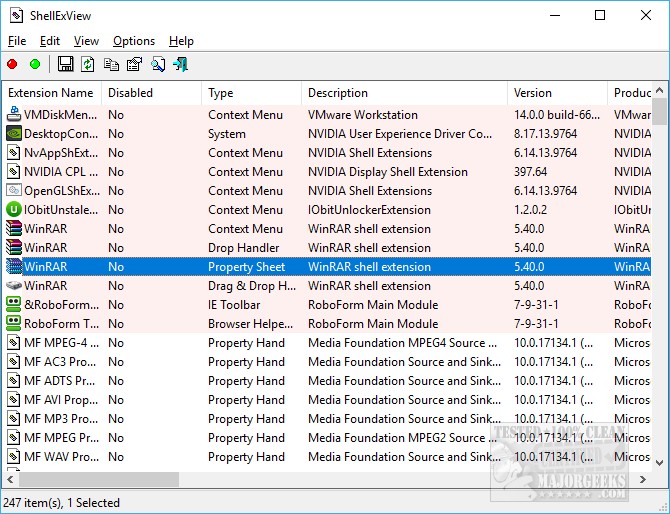
You will see hundreds of extensions unless you click on Options and check Hide all Microsoft Extensions. Now you can see all the shell extensions added by programs you installed.
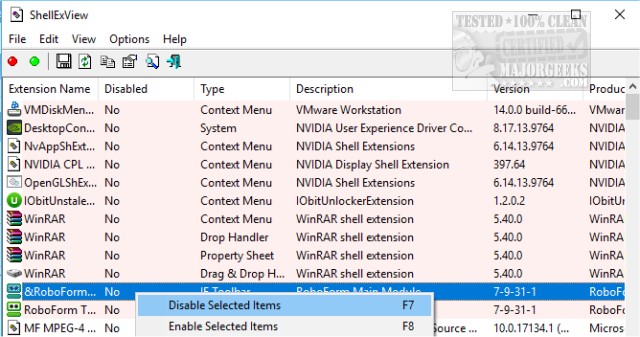
Right-click on any extension you don't need and select disable. Optionally, you can press CTRL+A to highlight everything, then press F7 to disable all.
Because you need to reboot after any items are disabled, our recommendation is to disable many of the newer items you don't use. For example, we had installed Acronis True Image recently, so knowing that we recently added Acronis, we disabled that, rebooted, and our problem was solved.
Here's a video on using ShellExView. It's getting old, but the app hasn't changed any.
If removing Context Menu items didn't solve your problem, there are a few other possibilities.
1: Scan for Malware: If you have not scanned for a while, download either Malwarebytes Anti-Malware, SUPERAntiSpyware Free or IObit Malware Fighter. All three work well, so flip a coin and pick one.
2: Check Windows Updates: Go to Start, Control Panel, Windows Updates and ensure that you have all the updates and that automatic updates are on. We've seen some suggestions that recommend you download a specific KB but check for updates.
3: Reset This PC:
Windows 10 now features the option to reset your PC. Rest This Pc is similar to reinstalling Windows except that Windows tries to save all of your personal files. We're not a fan of reinstalling, but when all else fails...
This article is an updated version of Fixing the Windows Explorer Crash or Freeze in Windows 7 with some changes to address Windows 10.
comments powered by Disqus
There is a good chance that an application you installed added what is known as a “shell extension” or "Context menu" item, and it is causing the crash. If you have ever right-clicked on a file or folder, those are your Context menu items.
To solve this problem, we want to disable or remove Context Menu items. To do this, we want to download ShellExView. ShellExView is portable so extract it to a folder of your choice and double-click on shexview.exe.
You will see hundreds of extensions unless you click on Options and check Hide all Microsoft Extensions. Now you can see all the shell extensions added by programs you installed.
Right-click on any extension you don't need and select disable. Optionally, you can press CTRL+A to highlight everything, then press F7 to disable all.
Because you need to reboot after any items are disabled, our recommendation is to disable many of the newer items you don't use. For example, we had installed Acronis True Image recently, so knowing that we recently added Acronis, we disabled that, rebooted, and our problem was solved.
Here's a video on using ShellExView. It's getting old, but the app hasn't changed any.
If removing Context Menu items didn't solve your problem, there are a few other possibilities.
1: Scan for Malware: If you have not scanned for a while, download either Malwarebytes Anti-Malware, SUPERAntiSpyware Free or IObit Malware Fighter. All three work well, so flip a coin and pick one.
2: Check Windows Updates: Go to Start, Control Panel, Windows Updates and ensure that you have all the updates and that automatic updates are on. We've seen some suggestions that recommend you download a specific KB but check for updates.
3: Reset This PC:
Windows 10 now features the option to reset your PC. Rest This Pc is similar to reinstalling Windows except that Windows tries to save all of your personal files. We're not a fan of reinstalling, but when all else fails...
This article is an updated version of Fixing the Windows Explorer Crash or Freeze in Windows 7 with some changes to address Windows 10.
comments powered by Disqus
