


File Extension Fixer Helps Repair Corrupt, Damaged Executables
By Timothy Tibbettson 06/15/2023 |
File Extension Fixer is a useful tool that is capable of repairing damaged executable file extensions.
You can also access and run the Task Manager, Registry Editor, System Restore, and MSConfig right from the app. File Extension Fixer includes several fixes to some common issues associated with modern malware to the windows registry.
File Extension Fixer comes in two versions, a .exe, and a .com. The .com is intended to be used if the .exe file association has been corrupted. It supports the following file extensions: EXE, MSI, REG, BAT, CMD, COM and VBS.
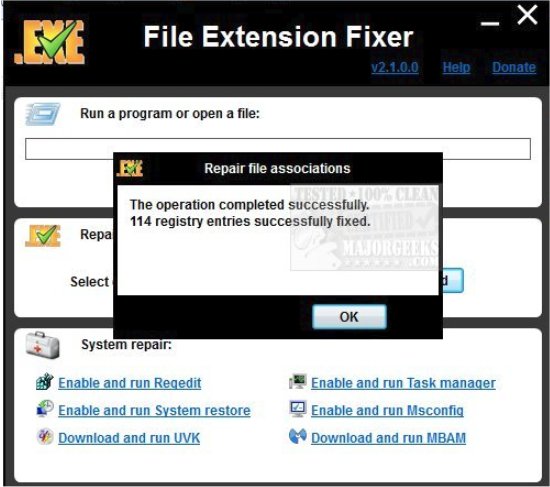
Once you have successfully launched File Extension Fixer, you will be able to run executable files even before repairing the file associations. Just enter the command you want to run in the text input box, or press the Browse button to locate the file using the Windows Shell. The input box also supports Drag and Drop. Just drag the file you want to open/run to the text box, and its full path will be automatically inserted. When ready, press the Run/Open button to open your file. This feature can also be used to access internet locations, or download files. Just enter or paste the URL you want to open to the text box and press Enter or the Run/Open button.
To repair corrupted file associations with File Extension Fixer, select the extension you wish to repair in the combo box. If you want to repair all seven file extensions listed above, select All. When ready, press the Fix selected button.
Download @ https://www.majorgeeks.com/files/details/file_extension_fixer.html
comments powered by Disqus
You can also access and run the Task Manager, Registry Editor, System Restore, and MSConfig right from the app. File Extension Fixer includes several fixes to some common issues associated with modern malware to the windows registry.
File Extension Fixer comes in two versions, a .exe, and a .com. The .com is intended to be used if the .exe file association has been corrupted. It supports the following file extensions: EXE, MSI, REG, BAT, CMD, COM and VBS.
Once you have successfully launched File Extension Fixer, you will be able to run executable files even before repairing the file associations. Just enter the command you want to run in the text input box, or press the Browse button to locate the file using the Windows Shell. The input box also supports Drag and Drop. Just drag the file you want to open/run to the text box, and its full path will be automatically inserted. When ready, press the Run/Open button to open your file. This feature can also be used to access internet locations, or download files. Just enter or paste the URL you want to open to the text box and press Enter or the Run/Open button.
To repair corrupted file associations with File Extension Fixer, select the extension you wish to repair in the combo box. If you want to repair all seven file extensions listed above, select All. When ready, press the Fix selected button.
Download @ https://www.majorgeeks.com/files/details/file_extension_fixer.html
comments powered by Disqus
