


Tired of AI Slop? Tell Google Which Websites You Actually Trust
By Jim McMahonon 10/31/2026 |
![{$insert['content_title']](/content/file/6555_hc.jpg
)
Searching used to be simple, and what made Google popular to begin with was its ability to rank search results that would give you relevant answers. With the advent of all this AI overview nonsense as the search superpowers race for dominance, searching for a simple answer now can feel like digging through a pile of garbage for that one thing you dropped in the can when you were in a hurry. No one likes that, but that does mean the big search powerhouse will stop.
You do have some options. You can always click the "web" only tab when you search, although Google properly buries that in the menus these days. You can also add -no ai to the end of your search. That works most times but can affect your results.
You could also add the MajorGeeks Classic Search Extension that works fairly awesome if you don't mind me bragging.

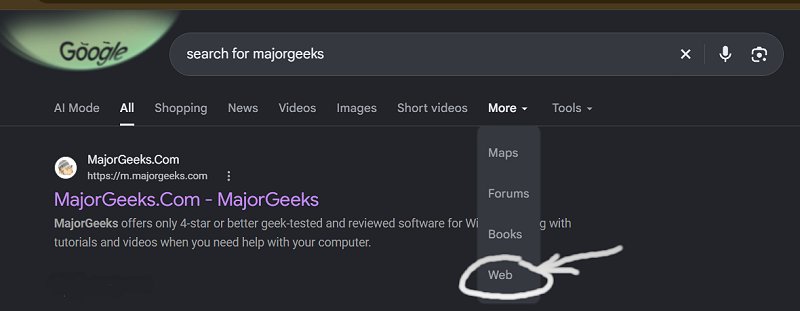
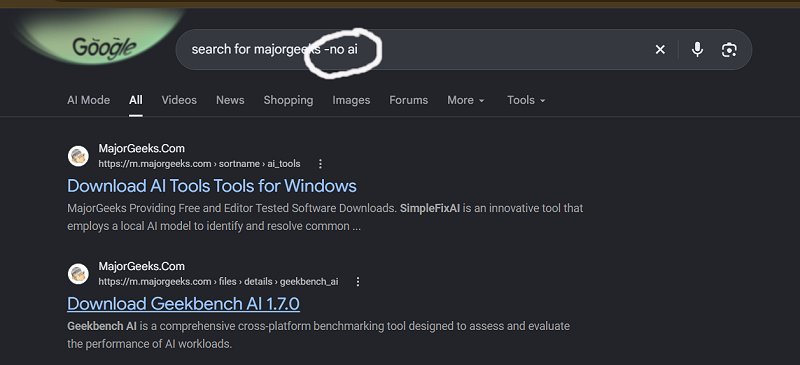
However, not all of these are super convenient for everyone.
Fortunately, Google has another feature worth knowing about: Preferred Sources. It lets you choose websites you want to see more often in parts of Google Search. It's also a super simple way to support sites you enjoy without spending a dime.
Naturally, we'd appreciate you adding MajorGeeks, and we will show you how to do that below. But this is useful for any eligible site that has earned your trust.
What Does Google's Preferred Sources Feature Do?
Preferred Sources gives Google an explicit preference for publications you like. When those sites publish fresh content relevant to your search, they can appear more often in Top Stories. Google also uses source preferences to personalize AI Mode and AI Overviews, where preferred sites can receive a badge identifying them.
Think of it as telling Google, "When these people have something relevant to say, I'd like to see it."
That doesn't guarantee your favorite site will appear in every search or jump to the top of all regular results. The feature applies to specific search experiences, and the content still needs to fit what you're searching for.
Why This Matters When You're Tired of AI Slop
The problem with AI slop isn't simply that somebody used AI. AI can be useful for editing, organizing ideas, explaining concepts, and plenty of other tasks. The problem is the publishing huge piles of disposable content without checking whether any of it helps… or is even true.
You know the kind. A troubleshooting article that takes eight paragraphs to tell you to restart your PC. A software review that reads like somebody rearranged the developer's feature list during a drinking binge. Instructions on how to find something in menu options that apparently exists only in the author's imagination.
Preferred Sources gives you a small amount of control over that experience. Instead of leaving every choice to Google, you can identify publications whose work you've found useful.
It isn't an AI-slop blocker. It won't inspect articles for accuracy, remove every junk website, or guarantee that your chosen sources always get things right. You're choosing the sources, so choose them because they've earned your trust or you like how they present the information.
That might be a technology site, your local newspaper, a specialist hobby publication, or someone who actually tests the things they write about.
Support Your Favorite Websites Without Spending a Dime
Running a website takes time, money, and people willing to do the work. Testing software, checking instructions, answering questions, and maintaining older articles don't happen because our server wakes up feeling ambitious that morning. It takes humans, attitude, no social life and coffee - a LOT of coffee!
Adding a site as a Preferred Source doesn't send the publisher a payment. What it can do is help you find that site again when it publishes something relevant.
That creates another opportunity to visit, read, share, and keep a relationship with a publication you value. For sites supported by advertising, subscriptions, or affiliate links, those reader relationships matter.
You don't have to buy anything. You're simply giving a site you like a better chance of staying in your reading routine.
How to Add MajorGeeks as a Preferred Source
You can use a link like https://www.google.com/preferences/source?q=(whateverSiteHere)
to any site you like, for example. To add MajorGeeks as a preferred site Open this link:
Add MajorGeeks as a Preferred Source on Google
Select MajorGeeks.Com.
Thats it.
You can also manage sources by clicking your image n the upper right of Chrome, and serach for Google's Search personalization → Source preferences settings, this link should get you there if you can find it. I had a hard time https://www.google.com/preferences/source?cs=1&hl=en
If you're reading Google News or using that app, you can also use the star/cards icon beside Top Stories when it appears.
Give Google a Little Direction
We spend plenty of time complaining about what Google shows us. Sometimes with good reason. This is one setting that lets us give it a clearer instruction and help you clean up your search while they figure out their mess.
If a website has helped you fix a problem, find useful software, understand something complicated, or avoid a bad purchase, adding it as a Preferred Source is a small way to return the favor.
Costs nothing. Takes a few clicks. And it gives the sites you actually want to read a better chance of finding their way back to you. Win / Win / Win

|
Jim McMahon
Jim McMahon, aka Corporal Punishment, is the founder of MajorGeeks.com. He has spent decades testing software, troubleshooting Windows, and helping users cut through the nonsense. He loves real freeware, hates bloatware, and runs on caffeine, sarcasm, and questionable choices. |
comments powered by Disqus
