


How to fix the Windows 7 MBR for 32-Bit
By Timothy Tibbettson 06/16/2023 |
MBR infections are only worsening and sometimes (rarely) can make computer unbootable after attempting to repair the infection. We recommend that you back up your data beforehand and then continue with the below if you wish to attempt to remove this infection:
Do you have your Windows 7 DVD? We need it to restore a clean MBR.
[*] If your PC is not configured to automatically boot from a CD/DVD, you may need to make changes to your BIOS to change the boot order boot from CD first. Or the may be an option to automatically get to a Boot Menu at startup from which you can choose to boot from CD.
[*] Reboot your computer.
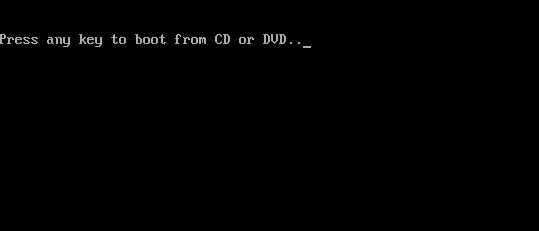
[*] You'll hear the DVD spinning up, be ready to press ANY key when you see the following message:
[*] This takes a while to load (30-45 seconds)
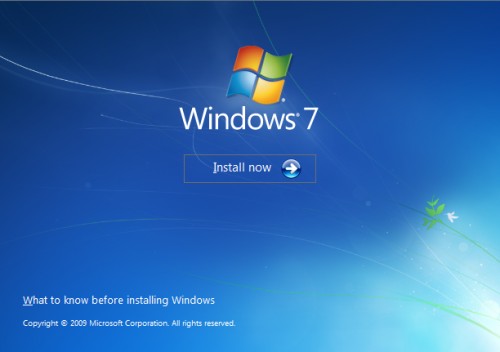
[*] When the below screen appears:
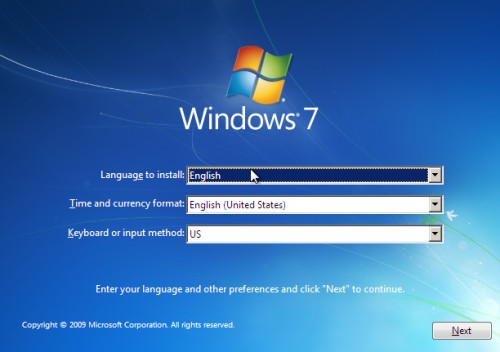
[*] Select your language and click Next.
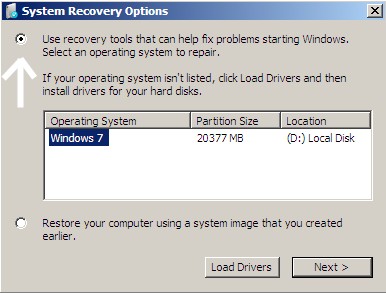
[*] Click the button for "Use recovery tools."
[*] Then select "Command Prompt."
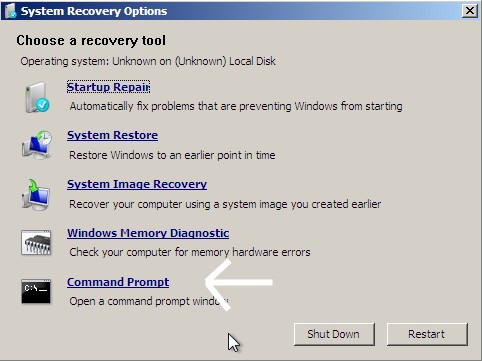
[*] When open, the command prompt will look like this:

[*] Type in bootrec /fixmbr and press ENTER
Note: There is only a SPACE after bootrec
[*] You should see:

[*] Type exit and press ENTER
[*] Now restart your computer WITHOUT booting off the DVD again (don't press a key when it says... "press any key to boot from cd/DVD...")
Now rerun MBRCheck and attach its latest log if you need help on the forums. How to attach items to your post
comments powered by Disqus
Do you have your Windows 7 DVD? We need it to restore a clean MBR.
[*] If your PC is not configured to automatically boot from a CD/DVD, you may need to make changes to your BIOS to change the boot order boot from CD first. Or the may be an option to automatically get to a Boot Menu at startup from which you can choose to boot from CD.
[*] Reboot your computer.
[*] You'll hear the DVD spinning up, be ready to press ANY key when you see the following message:
[*] This takes a while to load (30-45 seconds)
[*] When the below screen appears:
[*] Select your language and click Next.
[*] Click the button for "Use recovery tools."
[*] Then select "Command Prompt."
[*] When open, the command prompt will look like this:
[*] Type in bootrec /fixmbr and press ENTER
Note: There is only a SPACE after bootrec
[*] You should see:
[*] Type exit and press ENTER
[*] Now restart your computer WITHOUT booting off the DVD again (don't press a key when it says... "press any key to boot from cd/DVD...")
Now rerun MBRCheck and attach its latest log if you need help on the forums. How to attach items to your post
comments powered by Disqus
