


How to Prevent the Latest iOS Update From Causing High Data Charges
By Timothy Tibbettson 06/16/2023 |
This article will be a little deviation from the regular stories we post here at MajorGeeks that typically pertain to Windows based software, issues, walkthroughs, and the like.
This one concerns the Apple iPhone, the recent software update, and your hard earned money.
Now mind you I do not have any Apple products personally, but others in my household do, more specifically the iPhone. My girlfriend noticed some exorbitant data charges on a recent bill. The bill covers me, who never leaves the house and rarely even looks at my phone, her teenage daughter - my pick for the culprit with all her movie streaming, etc., and herself. But upon further research, there appears to be a change that was included in the recent update that causes the data issue. I owe her daughter an apology.
The change that is being targeted here is in the Terms and Conditions (Did you read it? Me neither.) and applies to Wi-Fi Assist (or Smart Network Switch on Android). Until this latest update this feature was off by default, but now it is switched on, and you agreed to it by updating. If you aren't familiar with this function, it assists your Wi-Fi by simultaneously using data to help keep speeds fast when the Wi-Fi signal strength is weak. Great for stability and speed right? Well, the data, of course, is billable but there is an easy remedy.
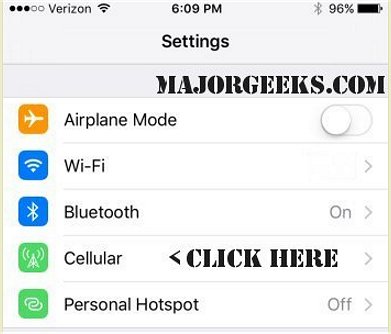
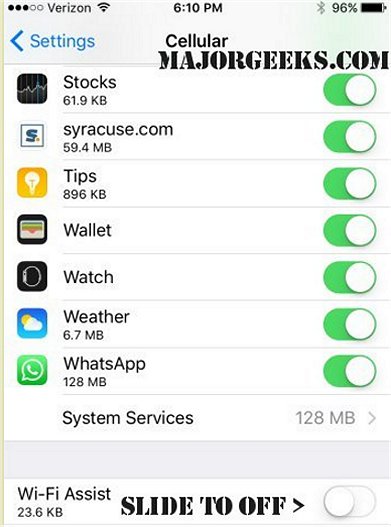
On your iPhone, go into your Settings, click on Cellular, then scroll all the way to the bottom to Wi-Fi Assist and slide it to the off position. That's it; now you will not use data if your Wi-Fi connection is slow or weak. This same remedy works for Android as well (it is still off by default for now). Go to Settings, Wi-Fi, More, Advanced then Smart Network Switch and make sure it is off.
Hopefully, this will help save someone a couple of dollars and keep a poor innocent teenage child out of the crosshairs.
comments powered by Disqus
This one concerns the Apple iPhone, the recent software update, and your hard earned money.
Now mind you I do not have any Apple products personally, but others in my household do, more specifically the iPhone. My girlfriend noticed some exorbitant data charges on a recent bill. The bill covers me, who never leaves the house and rarely even looks at my phone, her teenage daughter - my pick for the culprit with all her movie streaming, etc., and herself. But upon further research, there appears to be a change that was included in the recent update that causes the data issue. I owe her daughter an apology.
The change that is being targeted here is in the Terms and Conditions (Did you read it? Me neither.) and applies to Wi-Fi Assist (or Smart Network Switch on Android). Until this latest update this feature was off by default, but now it is switched on, and you agreed to it by updating. If you aren't familiar with this function, it assists your Wi-Fi by simultaneously using data to help keep speeds fast when the Wi-Fi signal strength is weak. Great for stability and speed right? Well, the data, of course, is billable but there is an easy remedy.
On your iPhone, go into your Settings, click on Cellular, then scroll all the way to the bottom to Wi-Fi Assist and slide it to the off position. That's it; now you will not use data if your Wi-Fi connection is slow or weak. This same remedy works for Android as well (it is still off by default for now). Go to Settings, Wi-Fi, More, Advanced then Smart Network Switch and make sure it is off.
Hopefully, this will help save someone a couple of dollars and keep a poor innocent teenage child out of the crosshairs.
comments powered by Disqus
