


How to Remove Ask Gemini From the Chrome Right-Click Menu
By Jim McMahonon 09/12/2026 |
![{$insert['content_title']](/content/file/6385_Image15.jpg
)
Google has been adding Gemini throughout Chrome, and one of the more annoying additions is Ask Gemini in the right-click context menu.
Highlight some text on a webpage, right-click it, and there it is.
I normally use that menu to search Google for whatever I highlighted, copy something, or occasionally inspect the page. I don’t need another option wedged into the menu trying to get my attention.
Do AI options have a place in a browser? Sure.
Do they need to be everywhere? No.
If I want an AI answer, I’ll ask an AI. I don’t need an Ask Gemini button following me around every time I right-click something.
Google started rolling this particular annoyance into Chrome around May 2026 and has been experimenting with its placement in the context menu. Recently, I finally got tired of looking at it and started figuring out out how to make it go away.
Fortunately, you still can.
Remove Ask Gemini From the Chrome Context Menu
I found a post at Google Chrome Help showing exactly where the setting is.
Open Google Chrome and enter the following in the address bar:
chrome://flags/#glic
Find the Glic flag and change it from Default to Disabled.
Click Relaunch to restart Chrome.
That’s it.
Go back to a webpage, highlight some text and right-click it. Ask Gemini should be gone from the context menu.
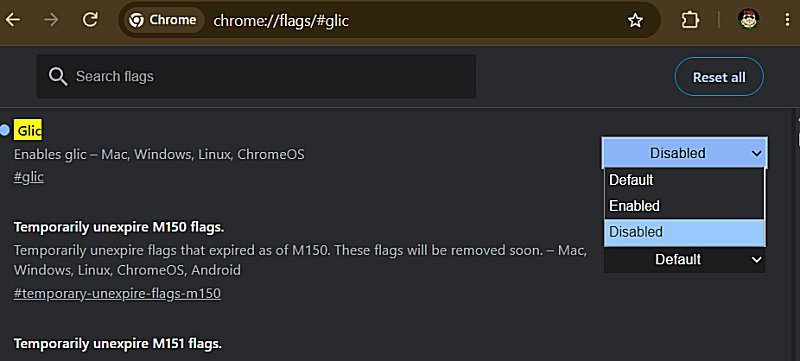
The Glic flags are part of Google’s Gemini integration with Chrome. Chromium’s own source code refers to Glic features for Gemini and specifically identifies a Glic context-menu entry as Ask Gemini.
Also, keep in mind that this is an experimental Chrome flag, not a permanent user setting. Google can rename it, remove it, or just re-enable it in a future Chrome update. But for now, disabling Glic works.
AI Doesn’t Need to Be Everywhere
By the way, this isn’t about pretending AI isn’t useful or wishing it would disappear. I use AI tools quite often espically for data crunching, spelling, and grammar. It’s about deciding when I want to use it rather than having every company shove another AI shortcut into whatever piece of software I’m already using.
We’re rapidly approaching Clippy territory here, and it has just become annoying.
Some of you may remember the idea behind Clippy? Don’t wait for the user to ask for help. Pop up and suggest something because maybe they need you.
Twenty-five years later, the hyperscalers seem to have decided Clippy wasn’t a bad idea after all. He was apparently just ahead of his time.
Search something? Here’s an AI summary.
Highlight something? Ask Gemini.
Typing an email to you mom? Let's have AI write that.
Right-click something? Ask Gemini.
At some point, helpful becomes clutter.
I also have some issues with AI-generated search summaries replacing the websites that actually created the information being summarized. It's legitimate copyright theft. That’s a much bigger discussion, but it makes me even less interested in having AI pushed into every corner of my browser. And, damn, let's not even get into the privacy and security issues.
If I want Gemini, ChatGPT, Copilot, or another AI, I know where to find them.
Sometimes I Just Want a Clean Menu
There’s also a much simpler reason for removing Ask Gemini: I don’t want it there.
I already have enough notifications and advertisements competing for my attention. A right-click menu is supposed to be a utility. The fewer unnecessary things in it, the faster I can find what I actually came there to use.
Daily, I use three browsers to keep different parts of my online life separated. Google Chrome handles most of my Google stuff, Edge gets the Microsoft stuff, and Opera One handles most everything else.
Lately, I’ve been leaning more on Opera One. It feels less cluttered; I like the interface, and managing the things I use regularly is easier. It also allows you to turn off unwanted options far easier that the other major browsers. Frankly, it's the best browser on the market right now.
Chrome is still Chrome, and I’m certainly not uninstalling it over one context-menu entry.
But if Google insists on putting Ask Gemini in my right-click menu, I’ll happily keep flipping the switch that takes it back out.

|
Jim McMahon
Jim McMahon, aka Corporal Punishment, is the founder of MajorGeeks.com. He has spent decades testing software, troubleshooting Windows, and helping users cut through the nonsense. He loves real freeware, hates bloatware, and runs on caffeine, sarcasm, and questionable choices. |
comments powered by Disqus
