


How to Uninstall Windows 10 Updates
By Timothy Tibbettson 06/15/2023 |
Due to the millions of possible Windows configurations, all of us have found problems with our computers after a Windows Update. A botched update can lead to hours of frustration often without finding a way to solve your problem. When you know it was a Windows Update that caused the problem, here's how you can uninstall the problematic update.
Find the Problematic Update
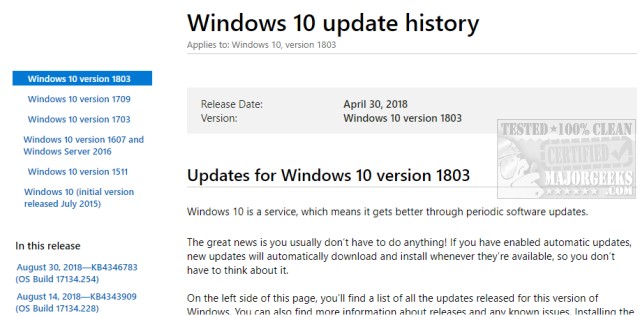
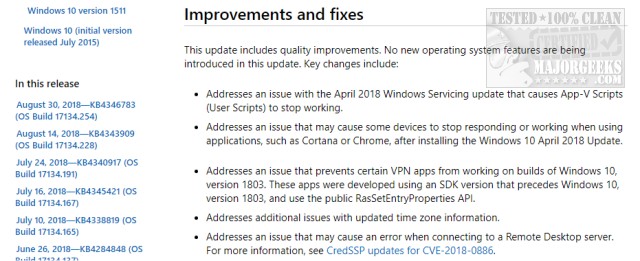
You might first want to try, and look up the latest Updates and see if your problem is related to a Windows Update. There are two things to look at here. First, look for the date of the Update just before your problem started. Second, click on that Update and scroll down first and look for Known issues for this Update. There's always at least one. Now, scroll back up and skim through Improvement and fixes. If your problem is listed here as part of a recent Update, you might try uninstalling that Update. Just because it's not a known issue does not mean it's not.
Uninstall Updates
If you've discovered an Update to remove, begin by pressing the Windows Key + S and begin typing Windows Updates and click on View your update history. Optionally, you can go to your Control Panel > Updates & Security > Windows Updates > View Update History. Now find and note the date next to the update you want to remove so you can easily find it in the next steps.
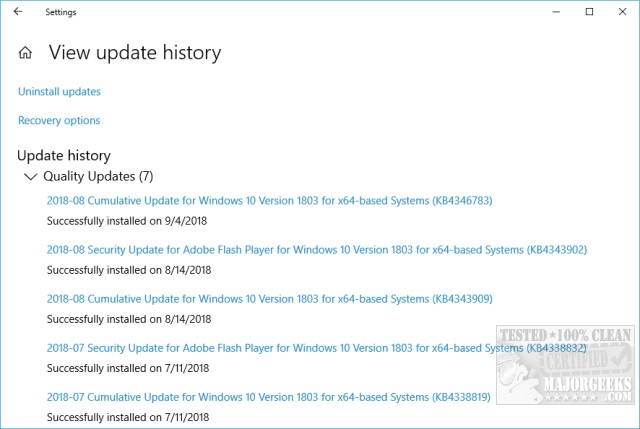
Click on Uninstall Updates. Now double-click on the update next to the date you took note of earlier.
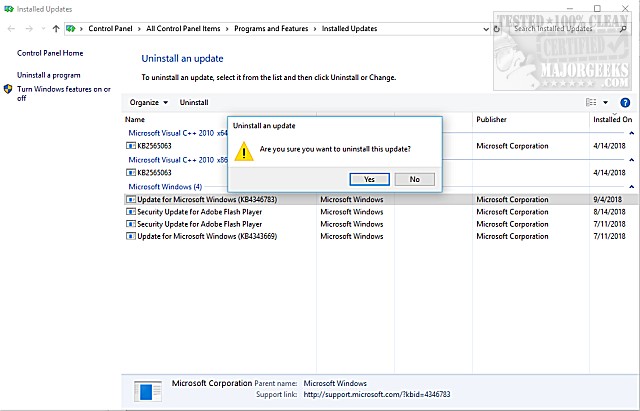
Click on Yes when prompted and the update will be uninstalled. A reboot will often be required.
That should solve your problem. Typically, Microsoft finds and fixes these problems so that you can reinstall this update later.
Similar:
How-To Delete Pending Windows Updates
Getting Windows Ready, Don’t Turn off Your Computer
Some Updates Were Canceled When Running Windows Update
Configure When and How Windows Updates Are Delivered
How-to Change Rollback Days for Windows 10 Feature Upgrades
comments powered by Disqus
Find the Problematic Update
You might first want to try, and look up the latest Updates and see if your problem is related to a Windows Update. There are two things to look at here. First, look for the date of the Update just before your problem started. Second, click on that Update and scroll down first and look for Known issues for this Update. There's always at least one. Now, scroll back up and skim through Improvement and fixes. If your problem is listed here as part of a recent Update, you might try uninstalling that Update. Just because it's not a known issue does not mean it's not.
Uninstall Updates
If you've discovered an Update to remove, begin by pressing the Windows Key + S and begin typing Windows Updates and click on View your update history. Optionally, you can go to your Control Panel > Updates & Security > Windows Updates > View Update History. Now find and note the date next to the update you want to remove so you can easily find it in the next steps.
Click on Uninstall Updates. Now double-click on the update next to the date you took note of earlier.
Click on Yes when prompted and the update will be uninstalled. A reboot will often be required.
That should solve your problem. Typically, Microsoft finds and fixes these problems so that you can reinstall this update later.
Similar:
How-To Delete Pending Windows Updates
Getting Windows Ready, Don’t Turn off Your Computer
Some Updates Were Canceled When Running Windows Update
Configure When and How Windows Updates Are Delivered
How-to Change Rollback Days for Windows 10 Feature Upgrades
comments powered by Disqus
