


How to Unlock Your PC If Hackers Have Used Lock My PC
By Corporal Punishmenton 05/12/2023 |
Scammer Payback is a well-known Youtube channel hosted by Pierogi - who efforts justice on scumbag call centers trying to scam you out of money.
In the video below, you will see how these low-lives try to impersonate GeekSquad (badly) and attempt to control a PC with Lock My PC - downloaded from MajorGeeks (@5:12) - which is intolerable.
Fortunately, the makers of Lock My PC have built a way to circumvent their program and allow you to gain access if one of these lowest of low-life criminals.
If you or a friend fall victim to this scam and are met with a Lock My PC lock screen when you try to log in, type "999901111" in the password line.
Do NOT press Enter or OK button.
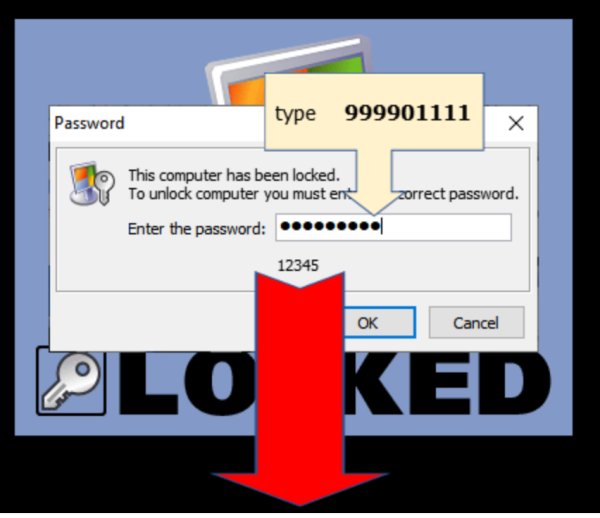
You will see a code that you enter into the authors' page to receive your personal unlock code.
If 999901111 doesn't work for you, you have the business edition of Lock My PC installed. You need to enter code 740619 to unlock the machine and uninstall the software.
comments powered by Disqus
In the video below, you will see how these low-lives try to impersonate GeekSquad (badly) and attempt to control a PC with Lock My PC - downloaded from MajorGeeks (@5:12) - which is intolerable.
Fortunately, the makers of Lock My PC have built a way to circumvent their program and allow you to gain access if one of these lowest of low-life criminals.
If you or a friend fall victim to this scam and are met with a Lock My PC lock screen when you try to log in, type "999901111" in the password line.
Do NOT press Enter or OK button.
You will see a code that you enter into the authors' page to receive your personal unlock code.
If 999901111 doesn't work for you, you have the business edition of Lock My PC installed. You need to enter code 740619 to unlock the machine and uninstall the software.
comments powered by Disqus
