


Icecream PDF Candy Provides Everything Required For Your PDF Needs
By Timothy Tibbettson 06/15/2023 |
Icecream PDF Candy is designed as an all-in-one PDF utility containing a comprehensive suite of tools that has everything needed for working with PDF files.
It is a versatile tool that will enable you to convert files from PDF to the various supported formats (PDF to DOC, PDF to JPG, etc.), convert documents, ebooks and images to PDF, merge PDF, split PDF, extract images and text from PDF, edit PDF metadata, protect PDF and unlock password-protected PDF files. Most modes support processing of files in bulk.
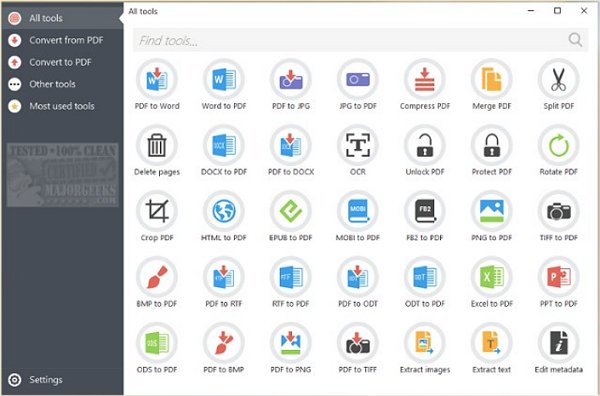
Icecream PDF Candy is displayed through a simple but modern interface with big buttons for each function. These functions are broken down and organized into two main categories; Convert to and Convert from PDF. It also includes additional tools for editing metadata, PDF compression, unlocking, protection, and many more. It is Freemium and only allows two tasks in the free version but a lifetime license is available for purchase which will upgrade to Pro. A nicely done app that groups together most of the essential PDF operations in a centralized location.
Download @ https://www.majorgeeks.com/files/details/icecream_pdf_candy.html
comments powered by Disqus
It is a versatile tool that will enable you to convert files from PDF to the various supported formats (PDF to DOC, PDF to JPG, etc.), convert documents, ebooks and images to PDF, merge PDF, split PDF, extract images and text from PDF, edit PDF metadata, protect PDF and unlock password-protected PDF files. Most modes support processing of files in bulk.
Icecream PDF Candy is displayed through a simple but modern interface with big buttons for each function. These functions are broken down and organized into two main categories; Convert to and Convert from PDF. It also includes additional tools for editing metadata, PDF compression, unlocking, protection, and many more. It is Freemium and only allows two tasks in the free version but a lifetime license is available for purchase which will upgrade to Pro. A nicely done app that groups together most of the essential PDF operations in a centralized location.
Download @ https://www.majorgeeks.com/files/details/icecream_pdf_candy.html
comments powered by Disqus
