


Lossless vs Lossy: When FLAC, APE, and ALAC Beat MP3 and When They Don't
By selma čitakovićon 12/06/2025 |
 Everyone and their grandmother knows about MP3 files, but what about the other, lesser-known audio file formats? Below, I'll explain the key differences between lossless and lossy formats, and help you choose the best ones based on your listening habits.
Also, I'll attempt to answer one of the most discussed questions among audiophiles: Is it possible to tell the difference between lossless and lossy audio?
Let's get right to it!
Lossless vs Lossy - What's the difference?
The difference between lossless and lossy audio lies in the compression process. Compression is all about lowering the digital audio file size while preserving important information. However, to cut down on file size, some data will have to either be discarded or replaced with a shorthand version. Simply put, lossless compression means no data is lost in the process, while lossy means, you guessed it, some data is lost.
Since lossless audio file formats remain identical to the source, they're high-quality but also take up more storage space. Popular examples include FLAC, ALAC, and WAV. Meanwhile, lossy formats sacrifice some audio information, which means they're lower quality, but also significantly smaller in file size. MP3, AAC, and OGG files are all lossy.
Now, the main question is:
Can your ears tell the difference between the two? If it's a high-quality MP3 file (320kps), with decent mastering, and decent gear, nope. Most people, even audiophiles, can barely tell the difference. But with a lower bitrate, the differences do become apparent. Additionally, it's more obvious with poorly mastered music.
Musical genres and your own familiarity with songs also play a role. Classical music, jazz, and generally acoustic recordings can be more detail-sensitive, with lots of different dynamics at play. Lossy audio formats can't reproduce them as faithfully as lossless ones. Also, if you listened to a certain song a lot, you're more likely to recognize how muddy cymbal hits sound in lossy formats.
If you're curious, you can do an ABX high fidelity test and see if your ears are up to the task. It's trickier than you'd expect!
When to use lossless audio file formats
You should use lossless audio file formats if your primary concerns are audio fidelity and quality. Maybe you're an audiophile, you work in professional audio production, or you're archiving audio. In those situations, lossless sound is the golden standard. Also, it's better utilized if you have quality gear and audio systems. There's no point in listening to FLACs on an awful, cheap Bluetooth speaker.
Most importantly, you'll need ample storage space to keep a lossless music library. FLAC files take up a looooot more space than MP3s.
Here's an example:
Aphex Twin's "Alberto Balsam" as a 320kbps MP3 file is 11.8 MB. However, as a FLAC, it's 47.3 MB. And that's just one song - imagine the album size difference!
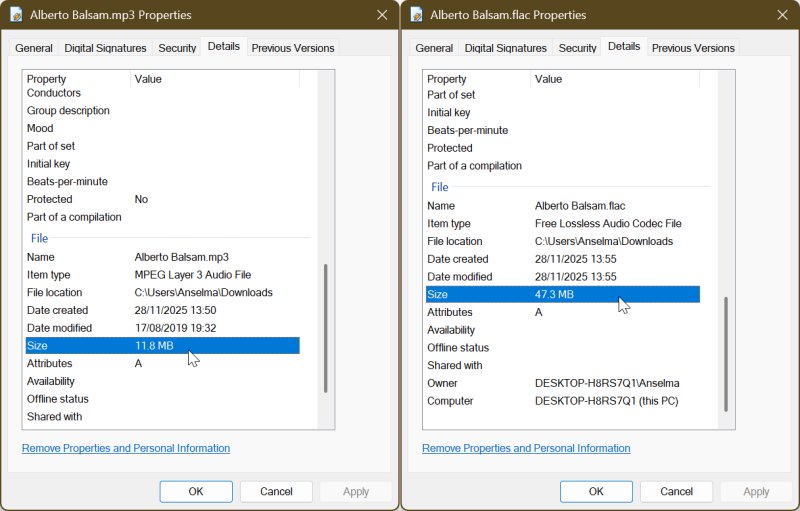
So, if you like to keep music on your phone, lossless files aren't the best option. External hard drives or NAS (Network Attached Storage) systems are popular storage solutions for growing FLAC, ALAC, and similar collections.
Here's a quick overview of some of the most common lossless audio file formats:
- FLAC - An open-source format that supports hi-res rates and stores metadata. It's widely supported, but doesn't work with Apple Music.
- ALAC - Basically, it's Apple's version of FLAC. It's not really used outside of iTunes and iPod products.
- APE - Developed by Monkey's Audio, APE used to be proprietary until 2023. However, it has limited compatibility, and it's much less relevant than FLAC nowadays.
- WAV - Lossless, but uncompressed, so the file size is large. It's used primarily during music production.
When to use lossy audio file formats
You should use lossy audio formats if you value convenience above all else. They're suitable for casual listening, streaming, or keeping a music library on your phone or lower-capacity hard drive. However, just because they're lossy doesn't mean you have to sacrifice quality. For example, 320kbps MP3 files are a great compromise if you're watching your storage space.
Furthermore, if the audio itself is poorly mastered or a bad recording, there's no need to go overboard with lossless formats. The audio quality won't magically improve.
You can use file converters like FFmpeg to keep your music collection in one file format type or to switch between various ones depending on your needs. It's a command-line tool that works with virtually any format.
Or, if you're like me and you want to easily manage your phone and computer music libraries, you can try FlacSquisher. It allows you to shift between FLAC, MP3, Opus, and OGG files.
Now, let's go over the most popular formats:
- MP3 - Convenient and universally compatible. It's ideal for storage and quick transfer.
- AAC - Apple's own take on MP3. It's used for Apple Music and YouTube mostly.
- OGG - An open-source alternative to MP3 and AAC. The full name is Ogg Vorbis. Fun fact: it's a combination of "ogging", a tactical move from the network game Netrek, and Vorbis, a character from Pratchett's Small Gods. That's about as geeky as it gets.
All things considered, lossy and lossless audio files have very different audiences and use cases. But that doesn't mean you have to pick a side! Nobody will revoke your audiophile card if you keep MP3 files.
For example, you can keep your mobile library lossy, and your home collection lossless. Most importantly, you can enjoy excellent sound quality, even with lossy files. The difference is practically inaudible in most cases, but it depends on the bitrate, mastering, genre, and other, entirely subjective reasons.

|
selma citakovic
Selma is a gamer, geek and gremlin hunter with a passion for cyber security and smashing Windows bugs before they bite. She’s IBM-certified, loves real freeware, despises bloatware, and powers most of her troubleshooting with an unhealthy amount of coffee. |
comments powered by Disqus
