


4 Ways to Get Microsoft Office For Free
By Timothy Tibbettson 06/15/2023 |
Microsoft Office is an excellent office suite and well worth the price for most. If you only use Office occasionally and can't afford the $69.99-$99.99 a year or $149 for Office 2019, we have some solutions for you.
While you can buy a cheap key (not recommended) or use a free alternative, there's nothing quite like Microsoft Office. It's one product that Microsft got right, and in many cases, you almost need it.
Video tutorial:
1: How to Get Microsoft Office Free - Office Online
There is only one way everybody can get Microsoft Office for free, and it's pretty awesome.
Go online to https://www.office.com/.
You only need a Microsoft account to log in. Microsoft Office online comes with 5GB of free cloud storage and all Microsoft Office apps you need, including Word, Excel, Outlook, Powerpoint, One Drive, One Note, To Do, Family Safety, Calendar, and Skype.
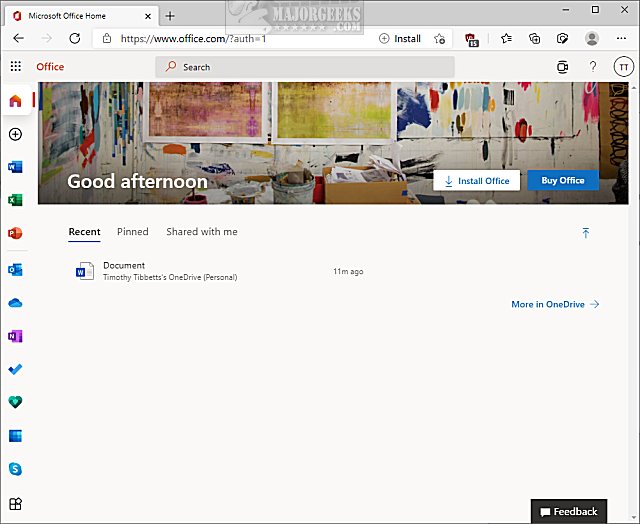
You can even create a Microsoft Office shortcut on your Desktop.
2: How to Get Microsoft Office Free - Android and iOS
If you want to use Office from your phone or tablet, you'll be glad to know that Microsoft Office is available for free for Android and Apple devices.
Download as you would any other app and log in.
3: How to Get Microsoft Office Free - Education
Students and educators at eligible institutions can sign up for Office 365 Education for free, including Word, Excel, PowerPoint, OneNote, and now Microsoft Teams, plus additional classroom tools. Use your valid school email address to get started today.
You need a school email to log in at https://www.microsoft.com/en-us/education/products/office.
If you don't have a school email, check this page for other options.
4: How to Get Microsoft Office Free - Share a Plan
Microsoft Office 365 Personal is $69.99 a year for one person, but Microsoft 365 Family is $99.99 a year for 6 people.
If you know someone who had the family plan, there's a chance they aren't using all six accounts.
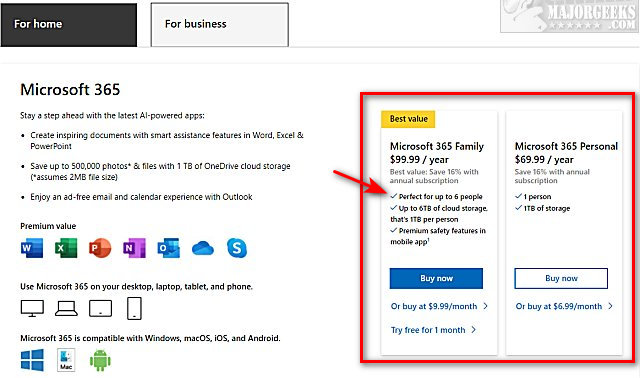
And while not free, if you can get 6 people to join in with you, now you're only paying $16.65 a year each. Not a bad deal!
That covers all the ways to get Office for free. Hopefully, one worked for you.
comments powered by Disqus
While you can buy a cheap key (not recommended) or use a free alternative, there's nothing quite like Microsoft Office. It's one product that Microsft got right, and in many cases, you almost need it.
1: How to Get Microsoft Office Free - Office Online
There is only one way everybody can get Microsoft Office for free, and it's pretty awesome.
Go online to https://www.office.com/.
You only need a Microsoft account to log in. Microsoft Office online comes with 5GB of free cloud storage and all Microsoft Office apps you need, including Word, Excel, Outlook, Powerpoint, One Drive, One Note, To Do, Family Safety, Calendar, and Skype.
You can even create a Microsoft Office shortcut on your Desktop.
2: How to Get Microsoft Office Free - Android and iOS
If you want to use Office from your phone or tablet, you'll be glad to know that Microsoft Office is available for free for Android and Apple devices.
Download as you would any other app and log in.
3: How to Get Microsoft Office Free - Education
Students and educators at eligible institutions can sign up for Office 365 Education for free, including Word, Excel, PowerPoint, OneNote, and now Microsoft Teams, plus additional classroom tools. Use your valid school email address to get started today.
You need a school email to log in at https://www.microsoft.com/en-us/education/products/office.
If you don't have a school email, check this page for other options.
4: How to Get Microsoft Office Free - Share a Plan
Microsoft Office 365 Personal is $69.99 a year for one person, but Microsoft 365 Family is $99.99 a year for 6 people.
If you know someone who had the family plan, there's a chance they aren't using all six accounts.
And while not free, if you can get 6 people to join in with you, now you're only paying $16.65 a year each. Not a bad deal!
That covers all the ways to get Office for free. Hopefully, one worked for you.
comments powered by Disqus
