


Netflix - We Need Your Help Resolving an Issue With Your Netflix ID
By Timothy Tibbettson 06/15/2023 |
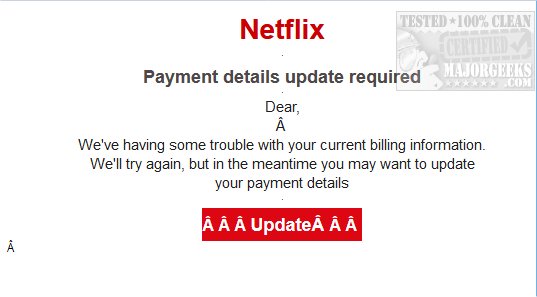
A Netflix email scam is making the rounds trying to trick you into giving up your Netflix billing information. The email title reads ["Netflix] - We Need Your Help Resolving an Issue With Your Netflix ID." As always, let's take a look at how to spot this scam.
1: Don't Click Links in Emails
Sure, you've probably heard this one before, but someone's doing it. Login to Netflix directly to confirm there isn't a problem. Always use this policy.
Of course, there are ways you can confirm you don't need to bother with a quick glance. Let's look at those.
2: Check the Email Address
See who the sender is. If it looks legit, follow rule #1. In this case, the sender was service@ some web site.co.uk. Yeah.
3: Check the Link
Line your mouse over the link and see what the address is. Odds are it's not Netflix.com. In this case, it was a .net web address, and we know Netflix is Netflix.com.
4: Look for Other Obvious Mistakes
It's rare that we don't spot an obviously fake email. In this example, you can some really stupid things in just two sentence. The standout here is the use of  over and over. Beyond that, the English and grammar appear to be excellent (as if we'd know) but again, it was ruined by the  over and over.
Another obvious mistake was the sender name. In this case, the sender was Security-Team. We don't know what Netflix uses in their emails, but you can bet it's not Security-Team.
That's about it. Again, phishing emails are almost always easy to spot and getting scammed is as simple as not clicking email links.
Be safe.
comments powered by Disqus
1: Don't Click Links in Emails
Sure, you've probably heard this one before, but someone's doing it. Login to Netflix directly to confirm there isn't a problem. Always use this policy.
Of course, there are ways you can confirm you don't need to bother with a quick glance. Let's look at those.
2: Check the Email Address
See who the sender is. If it looks legit, follow rule #1. In this case, the sender was service@ some web site.co.uk. Yeah.
3: Check the Link
Line your mouse over the link and see what the address is. Odds are it's not Netflix.com. In this case, it was a .net web address, and we know Netflix is Netflix.com.
4: Look for Other Obvious Mistakes
It's rare that we don't spot an obviously fake email. In this example, you can some really stupid things in just two sentence. The standout here is the use of  over and over. Beyond that, the English and grammar appear to be excellent (as if we'd know) but again, it was ruined by the  over and over.
Another obvious mistake was the sender name. In this case, the sender was Security-Team. We don't know what Netflix uses in their emails, but you can bet it's not Security-Team.
That's about it. Again, phishing emails are almost always easy to spot and getting scammed is as simple as not clicking email links.
Be safe.
comments powered by Disqus
