


RisohEditor Helps Manage DLL/EXE File Resource Data
By Timothy Tibbettson 06/15/2023 |
RisohEditor is designed to allow adding, editing, extracting and removing of resource data from DLL/EXE files.
You can easily edit Windows resources (Dialogs, Menus, Icons, Cursors, String Tables, Message Tables, etc.) by using RisohEditor - Risoh means ideal in Japanese.
It allows you to edit the source code for Windows apps through a simple UI allowing you to focus on the job and not navigating an overly complex interface. There is color coding for quick identification included helping to simplify the editing process further.
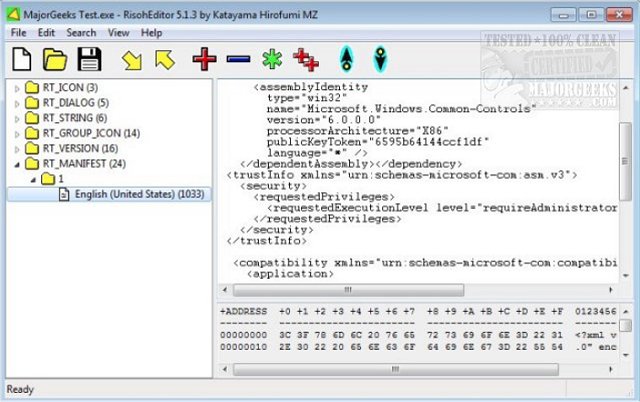
RisohEditor is a straightforward application that will assist you in the process of EXE editing. It permits you to add or remove parts of programs as well as edit texts and descriptions where needed. The intuitive interface makes it a good choice for users with basic programming skills.
Note: Avoid installing in "C:Program Files" or "C:Program Files (x86)" due to the resource compiler (windres) not accepting space characters in the file path.
Download @ https://www.majorgeeks.com/files/details/risoheditor.html
comments powered by Disqus
You can easily edit Windows resources (Dialogs, Menus, Icons, Cursors, String Tables, Message Tables, etc.) by using RisohEditor - Risoh means ideal in Japanese.
It allows you to edit the source code for Windows apps through a simple UI allowing you to focus on the job and not navigating an overly complex interface. There is color coding for quick identification included helping to simplify the editing process further.
RisohEditor is a straightforward application that will assist you in the process of EXE editing. It permits you to add or remove parts of programs as well as edit texts and descriptions where needed. The intuitive interface makes it a good choice for users with basic programming skills.
Note: Avoid installing in "C:Program Files" or "C:Program Files (x86)" due to the resource compiler (windres) not accepting space characters in the file path.
Download @ https://www.majorgeeks.com/files/details/risoheditor.html
comments powered by Disqus
