


Sordum Hibernate Enable or Disable Simplifies Disabling/Enabling of PC Hibernation
By Timothy Tibbettson 07/12/2023 |
Sordum Hibernate Enable or Disable is a portable app designed to allow for the simple disabling/enabling of hibernation on your machine.
The Windows hibernation file (hiberfil.sys) potentially takes up a lot of space on your machine. If you happen to be running low of disk space, you can use this tiny app to disable hibernation. Disabling hibernation removes the hibernation file which can be quite large freeing up space. Also, if you run an SSD, the constant writing to the hibernate file poses a detriment to the health of your SSD. This risk is due to that fact that SSDs can only sustain a limited number of writes before breaking or voiding the warranty.
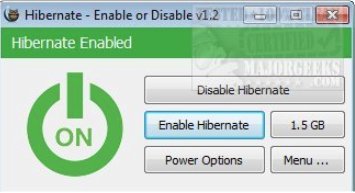
Utilizing Sordum Hibernate Enable or Disable is quite simple, run it and choose to either enable or disable hibernation. The app shows the status of the hibernation settings as well as the size and location of your hibernation file if enabled and you can additionally change the size of the hiberfil.sys file via the size button with options.
Sordum Hibernate Enable or Disable also supports command-line usage:
Commands:
/E : Enable Hibernate
/D : Disable Hibernate
/Minimum : Minimum hiberfile size
/Medium : Medium hiberfile size
/Maximum : Maximum hiberfile size
/Reduced : Reduced hiberfile size
Download @ https://www.majorgeeks.com/files/details/sordum_hibernate_enable_or_disable.html
comments powered by Disqus
The Windows hibernation file (hiberfil.sys) potentially takes up a lot of space on your machine. If you happen to be running low of disk space, you can use this tiny app to disable hibernation. Disabling hibernation removes the hibernation file which can be quite large freeing up space. Also, if you run an SSD, the constant writing to the hibernate file poses a detriment to the health of your SSD. This risk is due to that fact that SSDs can only sustain a limited number of writes before breaking or voiding the warranty.
Utilizing Sordum Hibernate Enable or Disable is quite simple, run it and choose to either enable or disable hibernation. The app shows the status of the hibernation settings as well as the size and location of your hibernation file if enabled and you can additionally change the size of the hiberfil.sys file via the size button with options.
Sordum Hibernate Enable or Disable also supports command-line usage:
Commands:
/E : Enable Hibernate
/D : Disable Hibernate
/Minimum : Minimum hiberfile size
/Medium : Medium hiberfile size
/Maximum : Maximum hiberfile size
/Reduced : Reduced hiberfile size
Download @ https://www.majorgeeks.com/files/details/sordum_hibernate_enable_or_disable.html
comments powered by Disqus
